 NextNeural
Build an Automated Voice Bot with NextNeural API Integration
Imagine a real estate company launching a new project. In one day, over 2,000 leads come in, and each one needs a call to confirm their site visit. Doing this by hand means a big calling team, working through long lists for hours. Some people don’t pick up the first time. Some get different information depending on who calls them. And if a lead doesn’t hear back fast enough, they often just drop off.
Hiring more callers can help, but it takes time to train them, more phone lines, and more money. And the same problem comes right back the next time leads spike.
This is exactly what voice bots are good at. A voice bot doesn’t get tired. It calls the moment a lead comes in, and it can handle twenty calls or two thousand calls just as well.
We have built NextNeural for this purpose. There are two ways to use it for your real estate business.
- Sovereign deployment: NextNeural builds the entire voice system inside your own infrastructure. Every call, recording, and customer detail stays with you. This works well for larger real estate groups that need strict data control.
- NextNeural API: The quicker option. Your developer connects it to your CRM with a few lines of code, and NextNeural takes care of the calling on the backend.
Most teams try the API first, since it’s the fastest way to see it working.
Every Lead Gets Called Right Away
Potential clients can wait a day for a callback and book somewhere else instead. NextNeural fixes that first. The moment a new lead comes in, an outgoing call goes out to them right away.
Setting this up means connecting NextNeural to your CRM, so that when a new lead shows up, their details go straight into a call. Here’s what that setup actually looks like, a small script that fires off a call the moment it runs, with the lead’s site visit details filled in.
import os
import requests
from fastapi import FastAPI
from dotenv import load_dotenv

# Load environment variables
load_dotenv()
API_KEY = os.getenv("NEXTNEURAL_API_KEY")
CAMPAIGN_ID = os.getenv("CAMPAIGN_ID")

BASE_URL = "https://api.nextneural.ai/v1"

app = FastAPI(title="NextNeural Auto-Dialer")

# This fires the moment your server starts.
# In production, this would fire from a CRM webhook instead.
@app.on_event("startup")
def trigger_automatic_call():
    print("=====================================================")
    print("SERVER STARTING: Initiating automated NextNeural call...")

    url = f"{BASE_URL}/calls"

    headers = {
        "Authorization": f"Bearer {API_KEY}",
        "Content-Type": "application/json"
    }

    # Swap these details for your lead's site visit information.
    payload = {
        "to": "+919876543210",
        "campaign_id": CAMPAIGN_ID,
        "contact_name": "Rohit Malhotra",
        "metadata": {
            "customer_name": "Rohit Malhotra",
            "project_name": "Sunrise Residences",
            "unit_type": "3 BHK",
            "site_visit_date": "14 June 2026",
            "site_visit_time": "11:00 AM",
            "sales_executive": "Priya",
            "location": "Sector 150, Noida"
        }
    }

    try:
        response = requests.post(url, headers=headers, json=payload)
        response.raise_for_status()

        data = response.json()
        print(f"SUCCESS! Call queued. UUID: {data.get('call_uuid')}")
        print("Pick up your phone!")

    except requests.exceptions.RequestException as e:
        print("FAILED to trigger call.")
        try:
            print("Error Details:", response.json())
        except Exception:
            print("Error:", str(e))

    print("=====================================================")

@app.get("/")
def read_root():
    return {"status": "Server is running, and the automated call was fired on startup."}
A phone rings within moments of someone booking a visit, and whoever picks up already knows the project, the unit, and the exact time.
Why This Works
- No more waiting: Every lead gets a call within minutes.
- No more mixed messaging: Every call has the same correct details, no matter who picks it up on the other end.
- Nothing gets missed: If a call fails, you’ll know right away instead of finding out weeks later.
Less Hiring, Less Training
Adding more callers simply means adding more AI Agents with their own name, identity and voice preferences.
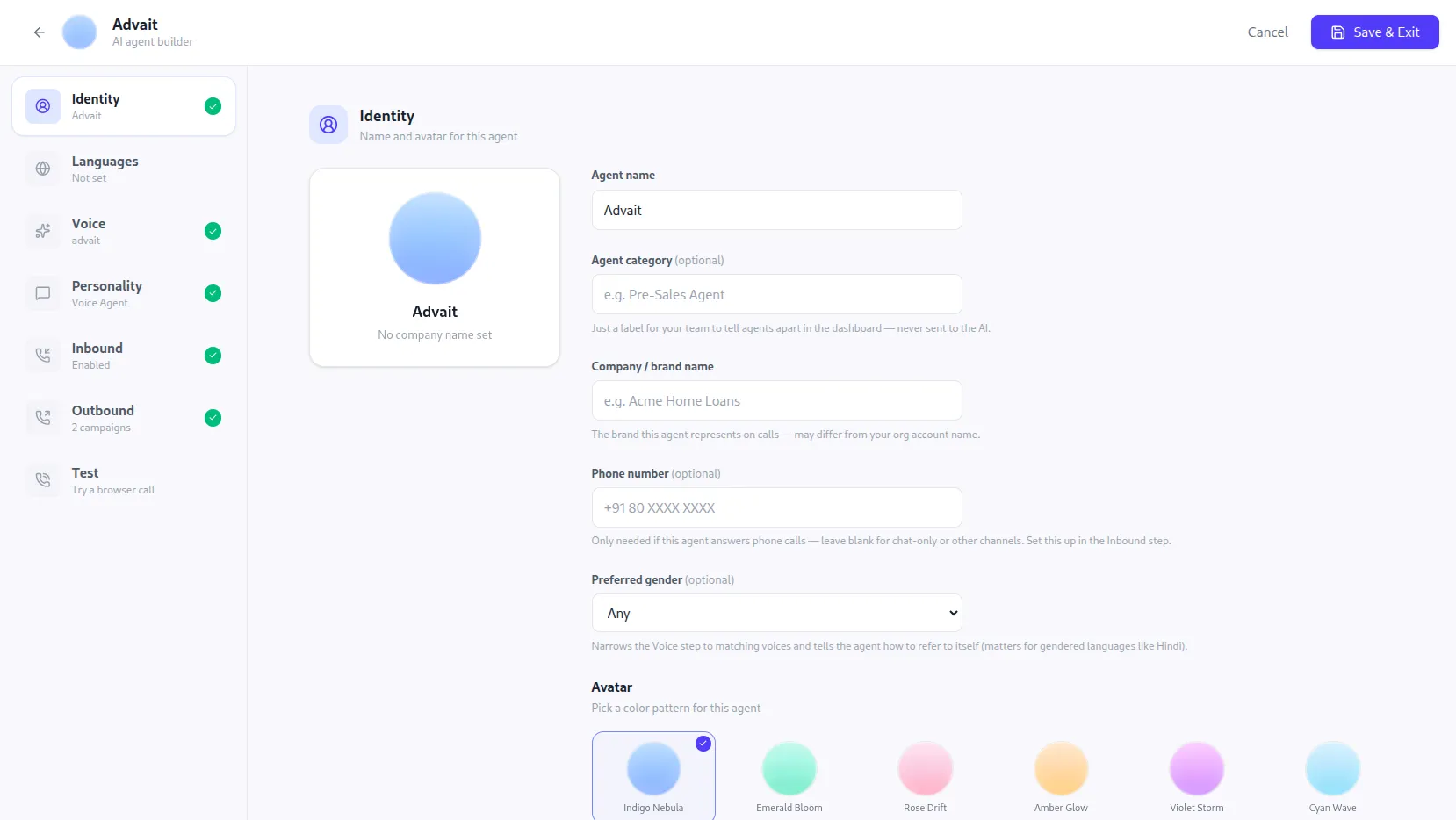
Setting up an agent’s identity, name, brand, and voice preferences in the NextNeural AI agent builder.
You also decide exactly what the agent should say and do on a call. Set up a workflow like the one below, and it tells the agent how to handle a property inquiry, what to ask, and when to pass the call along. Set it up once, and every call after that follows the same script.
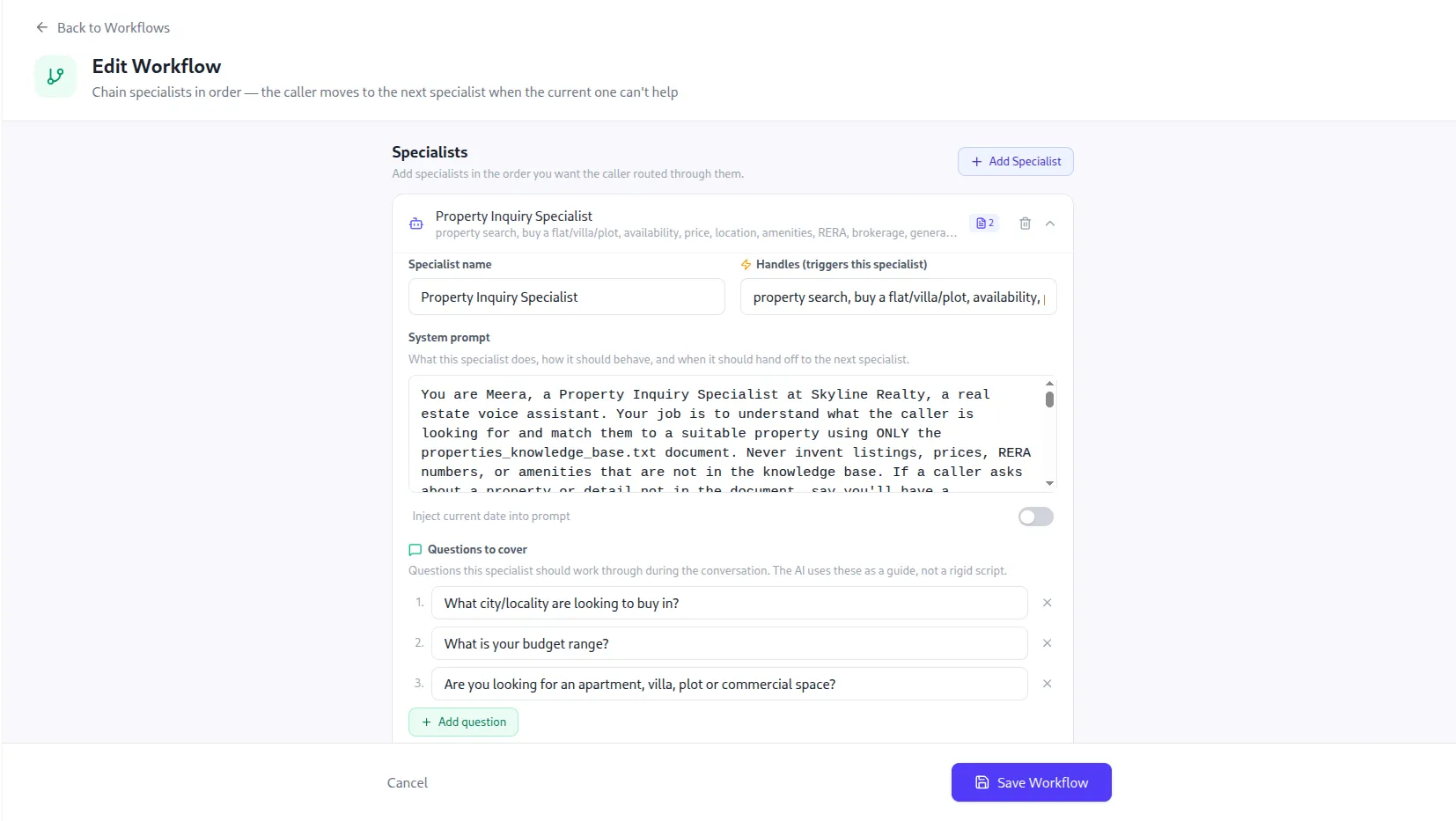
Configuring a Property Inquiry Specialist workflow, including its system prompt and the questions it works through on each call.
No one has to train a new hire on this. No manager has to listen in to check the quality. Once it’s set up, it stays consistent.
What Actually Changes
| Feature | Before, Manual Calling | After, NextNeural |
|---|---|---|
| Volume | Limited by how many callers are working that day | Handles 2,000 or more calls a day, no extra hiring needed |
| Consistency | Changes depending on who’s making the call | Every lead hears the same correct details, every time |
| Speed | Leads often wait a day or more for a callback | Calls go out the moment a visit is booked |
| Records | Notes are often incomplete or missing | Every call is logged, with a full record of what happened |
| Setup | Hiring, training, and managing shifts | A quick API setup, or a fully private deployment |
A Quick Look Under the Hood
Here’s the short version, in plain terms.
- The API key stays private: It’s kept in a separate settings file instead of being typed into the script itself, so it never gets exposed by accident.
- The call goes out automatically: The script reaches out to NextNeural and asks it to make the call. In a real setup, this would be triggered the moment a lead books a visit on your CRM.
- One request does the job: A single message gets sent to NextNeural with the lead’s phone number and details attached. That’s enough to queue the call.
- The details make it personal: The project name, unit type, visit time, and the sales executive’s name all get passed along, so the call sounds like it’s about that one lead, not a generic recording.
- Errors don’t go unnoticed: If a call can’t go through, for whatever reason, the script logs exactly what went wrong instead of failing quietly.
That’s really it. A short script, a few details filled in, and a real phone call goes out on its own.
It Doesn’t Take Long to Set Up
This isn’t a long rollout. Most teams are up and running faster than it takes to hire and train just one new caller.
- Connect your CRM: NextNeural works with the system you already use, so there’s nothing new to learn.
- Choose how you want to deploy: Go with the API if you want to move fast, or a private deployment if data control matters more to you.
- Start calling: Most teams get their first calls going within a few days.
A Few Months Later
A few months into this, the sales team isn’t spending mornings working through call lists anymore. Confirmation calls happen on their own, right when a visit is booked. That frees up the team to spend their time meeting leads who are actually ready to buy.
With NextNeural, real estate teams get the same result whether it’s twenty calls a day or two thousand. You can do it through a simple API, or a fully private deployment built around your own systems.
Want to see how NextNeural fits into your sales workflow? Visit NextNeural today to explore both options and start automating your first 100 calls.
Built by the Team Behind Superteams.ai
NextNeural is built and run by Superteams.ai, an R&D-first team that ships production-grade AI systems in 30 to 90 days, across real estate, fintech, and SaaS. The same team behind this platform is the one you’d be talking to.
If you want help wiring NextNeural into your own CRM, book a strategy call with Superteams.
Ready to Transform Your Business with AI?
Join NextNeural today and deploy production-ready AI agents in minutes.
Build an Agent