 NextNeural
How NBFCs Can Build Voice AI Workflows for Loan Qualification and Collections
If you work at an NBFC, your phone’s always buzzing.
Someone calls to ask about a personal loan. Someone else needs help understanding their EMI. A customer who missed a payment wants to know their repayment options. And then there are people who are interested in a loan but need to be qualified before a sales executive spends time following up with them.
Now imagine handling a large part of these conversations over a phone call, not with a rigid IVR, but with an AI agent that actually listens, understands what the customer is asking, responds in their preferred language, pulls from your company’s knowledge base, qualifies the customer, and brings in a human when the conversation needs one.
That’s where Voice AI gets actually powerful for NBFCs, instead of being just a nice idea. The Reserve Bank of India’s Annual Report 2024-25 notes that 2.96 lakh complaints were received by RBI Ombudsman offices, and complaints related to loans and advances made up the largest category. Over 91% of those complaints were lodged digitally. Meanwhile, the IAMAI-Kantar ICUBE 2025 report estimates that of India’s 950 million internet users, approximately 98% accessed the internet in Indic languages, with 57% of urban users preferring regional languages over English.
The numbers point to two realities: customers are increasingly getting comfortable interacting with financial services digitally, while a large share of India’s internet users prefer to engage in Indic languages. That makes the customer conversation itself an important part of the digital experience and an area where Voice AI can make a meaningful difference.
In this article, we’ll walk you through exactly how an NBFC can build a Voice AI agent from scratch, step by step, with screenshots from the NextNeural Voice AI platform. We’ll also unpack the two use cases where this makes the biggest difference: qualifying loan enquiries and running collections.
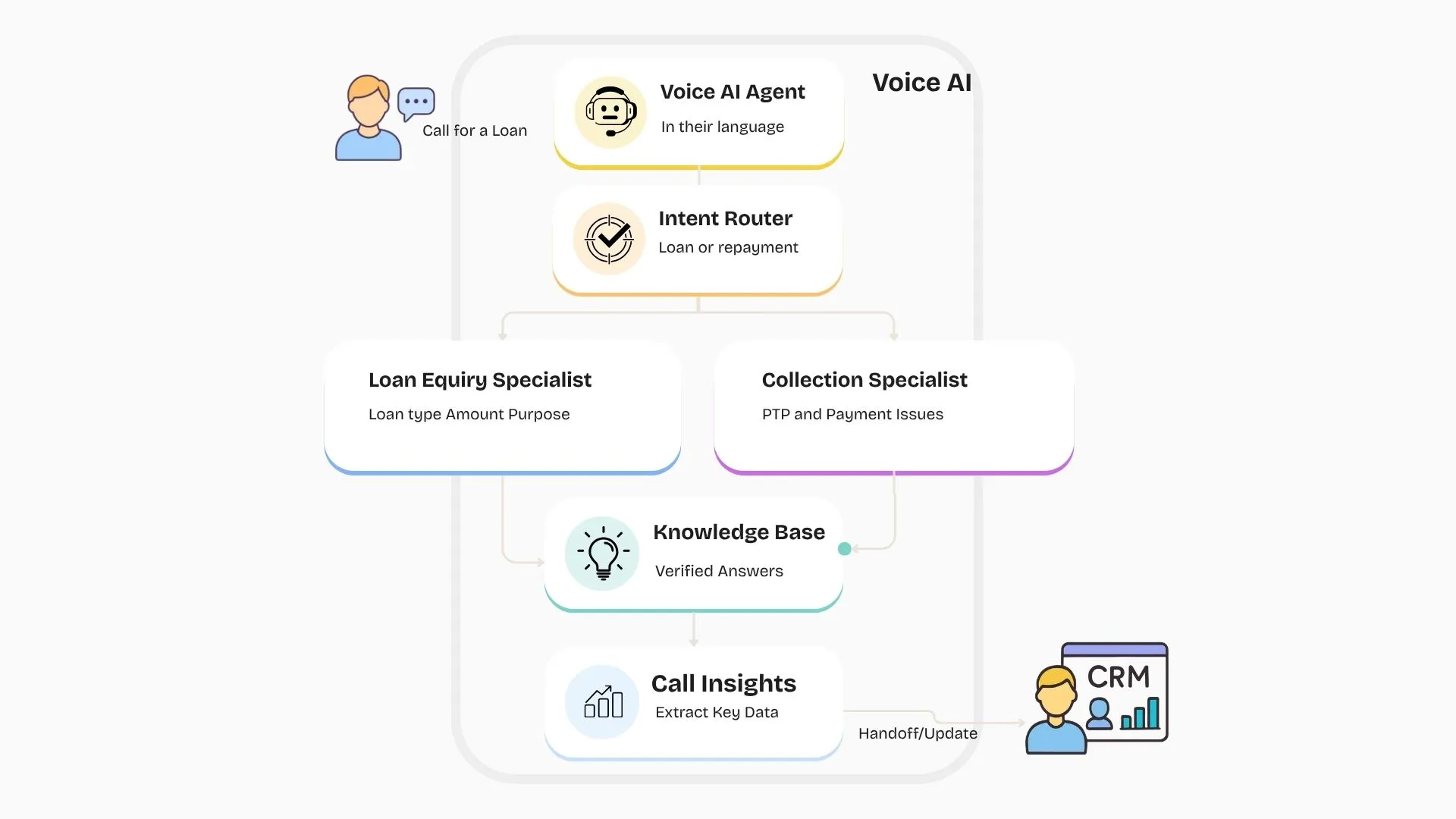
Why NBFCs Need This: Two Important Use Cases, One Platform
Before we get into the build, it’s worth understanding the two problems Voice AI can actually solve for an NBFC.
Loan enquiries. A customer fills out an enquiry form or calls in about a loan. Your sales team can’t manually call and qualify every single lead the moment it comes in, so leads sit for hours, sometimes days. By the time someone calls back, the customer has already enquired somewhere else. A Voice AI agent can make that first call within minutes, ask what type of loan the customer wants and roughly how much, and pass a warm, qualified lead straight to a human agent while the customer is still interested.
Collections. NBFCs can have thousands of customers to reach out to every day, and the real challenge isn’t making the calls. It’s keeping track of what happened in every single one. In collections, the most important thing is PTP, or Promise to Pay. Did the customer promise to pay? When? Did they actually pay? If not, when do you follow up again? Multiply that across a customer base in the thousands, spread across soft bucket and hard bucket customers at very different stages of delinquency, and you can see why this gets hard to track manually.
Voice AI can have these conversations and capture the outcome automatically: PTP given, callback requested, customer unavailable, payment issue, follow-up required. It also solves a second, less obvious problem: agent churn. When agents change frequently, so does the customer’s experience, and a new hire starting from a spreadsheet instead of a real conversation history is expensive for the business and frustrating for the customer. A Voice AI layer keeps the campaign logic, messaging, and follow-up approach consistent no matter who’s on the team that week. It also remembers. If a customer explained their situation and promised to pay on Friday, the next call can start with that context instead of asking them to explain everything all over again.
Both use cases are built the same way on the platform: an AI agent, given a voice, a personality, and a knowledge base, routed through a workflow. Here’s how that comes together.
Step 1: Start from the Dashboard
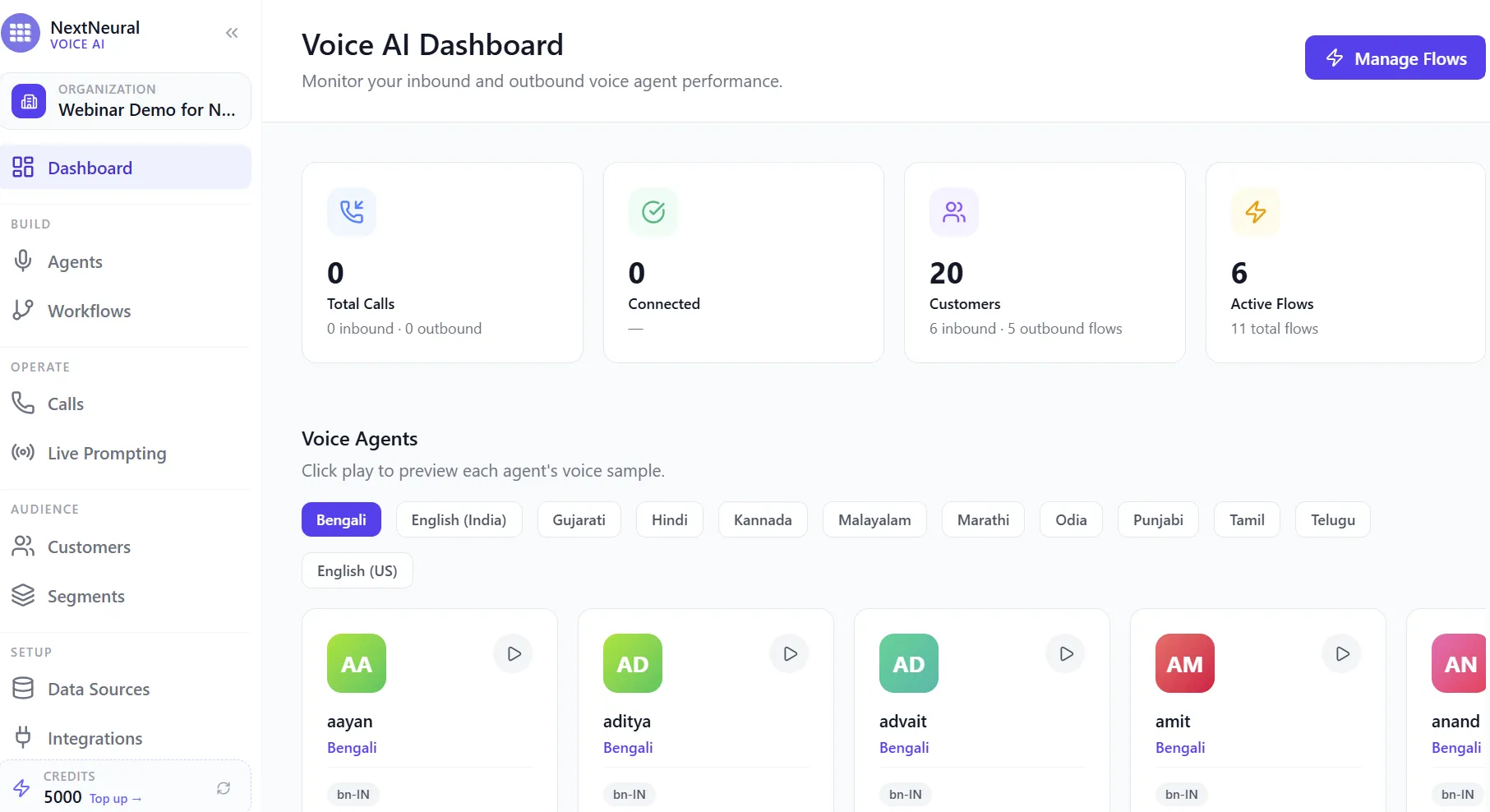
Everything begins on the Voice AI dashboard, where you can see your active agents, total customers, and flows at a glance. This is also where you can preview each agent’s voice sample across languages before you build anything.
Step 2: Add Your Customers
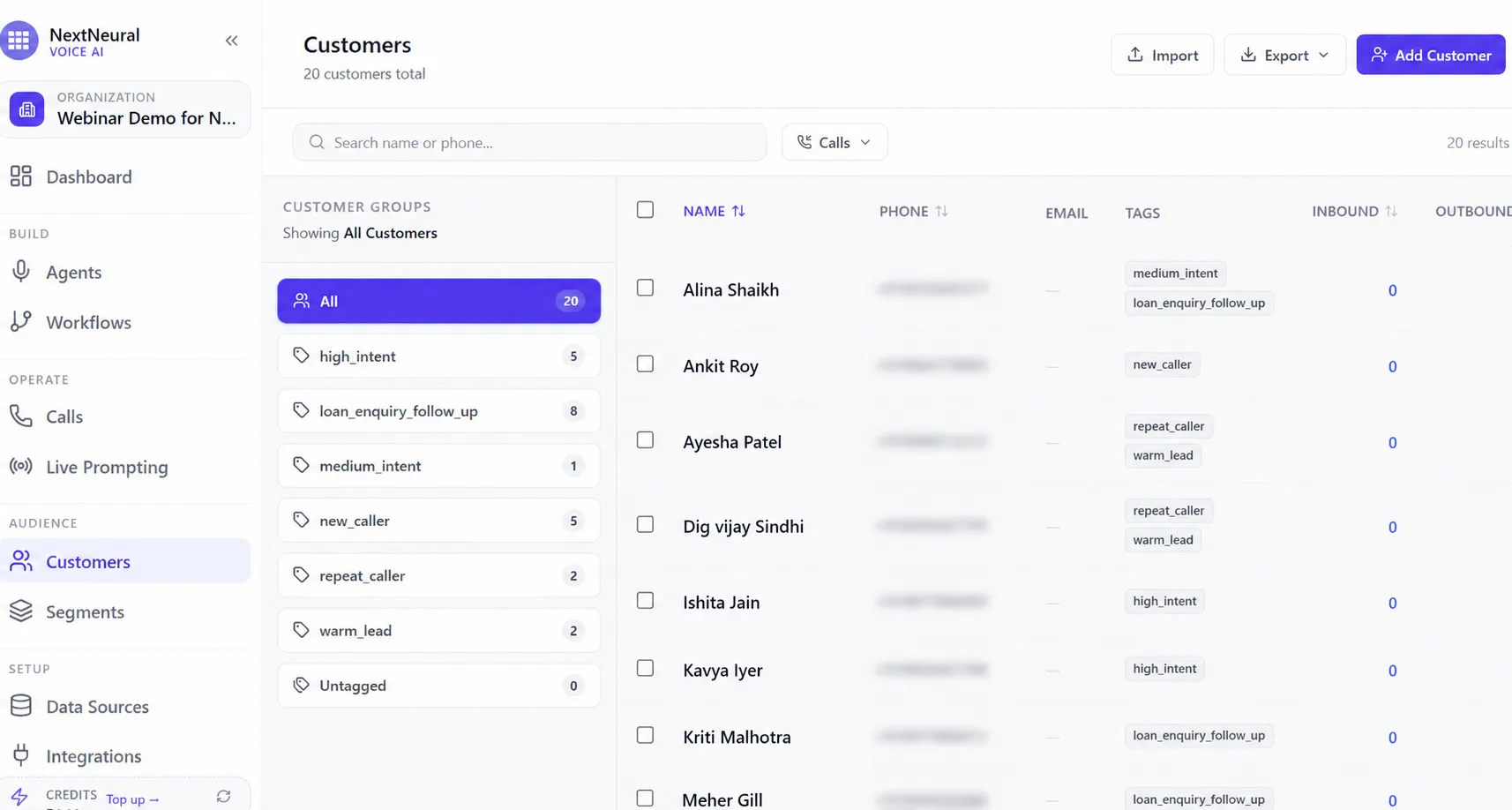
Before your agent can call or be called by anyone, you need a customer base to work with. You can import customers along with tags like high_intent, warm_lead, loan_enquiry_follow_up, or new_caller. These tags are exactly what let you segment leads by intent later, so your sales team can prioritise the customers most likely to convert instead of working through a flat list.
Step 3: Upload Your Knowledge Base
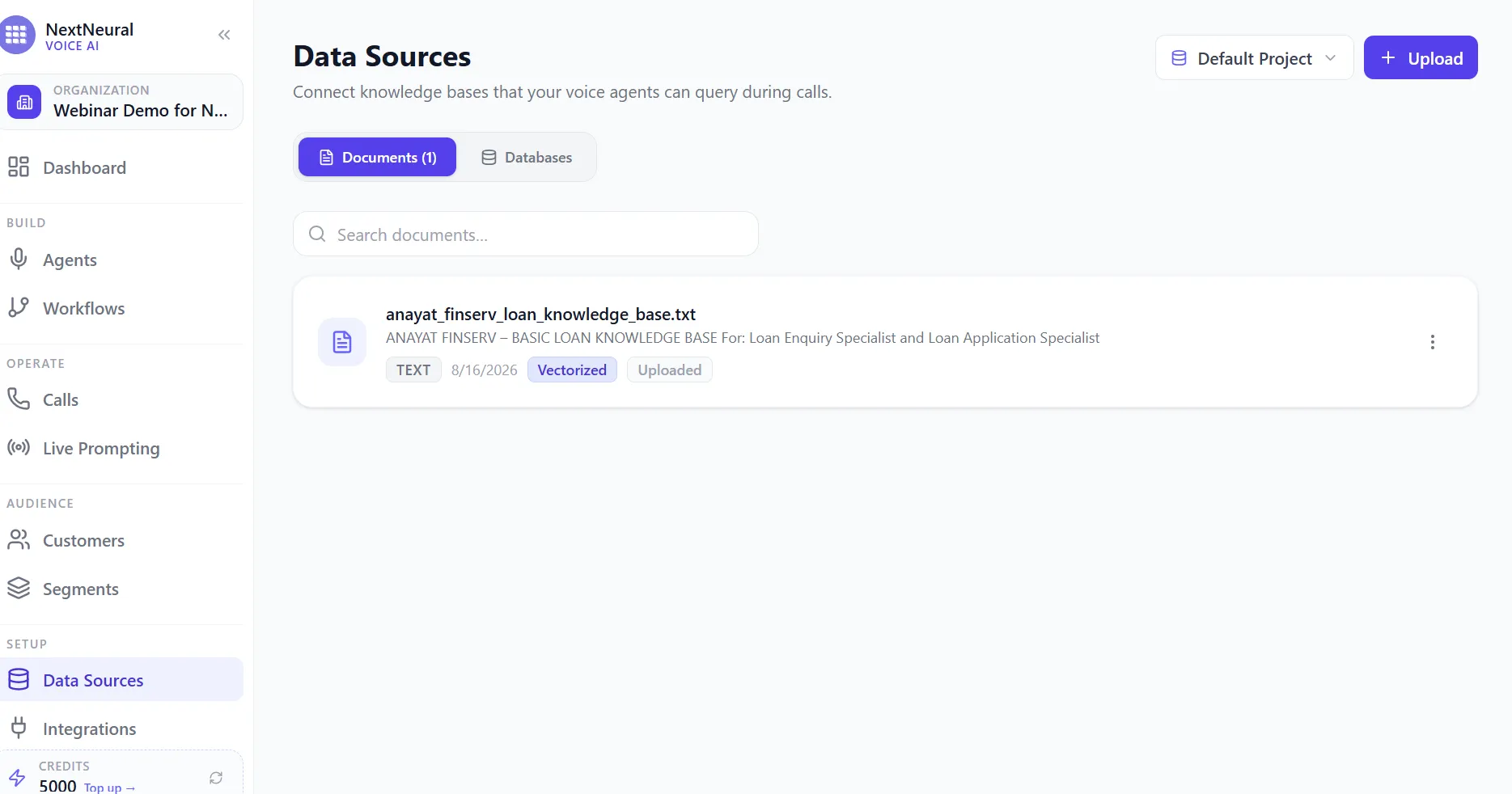
An AI agent shouldn’t be left to invent answers to financial questions. Upload your approved loan information, eligibility criteria, documentation requirements, and policies as a knowledge base document. The agent will query this during calls instead of guessing, which matters a lot when a customer asks something like “what documents do I need” or “can I apply if I’m self-employed.”
Step 4: Go to the Agents Tab
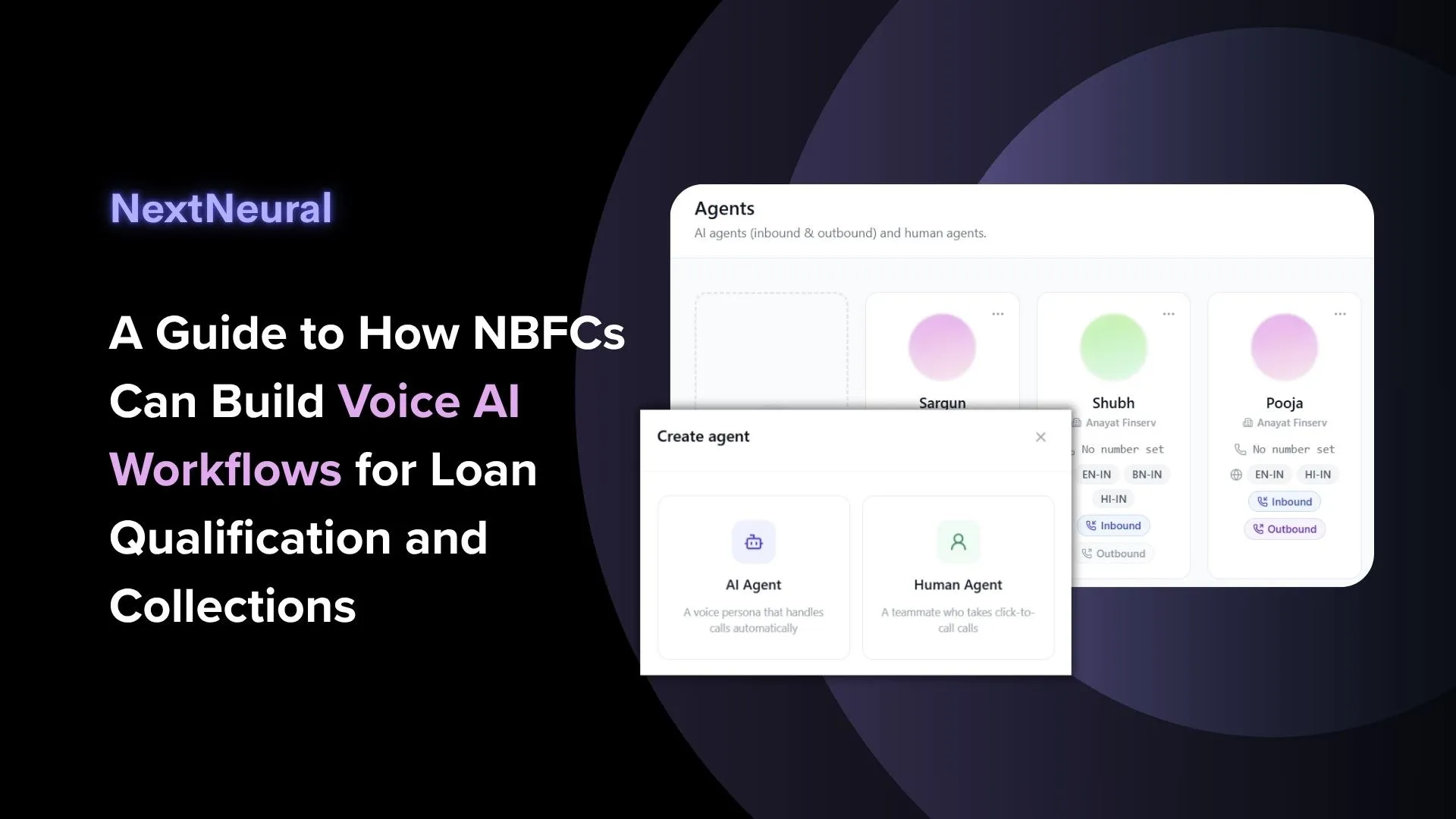
This is where you build and manage both your AI agents and your human agents. You can see at a glance which agents are set up for inbound calls, outbound calls, or both, and which languages each one handles.
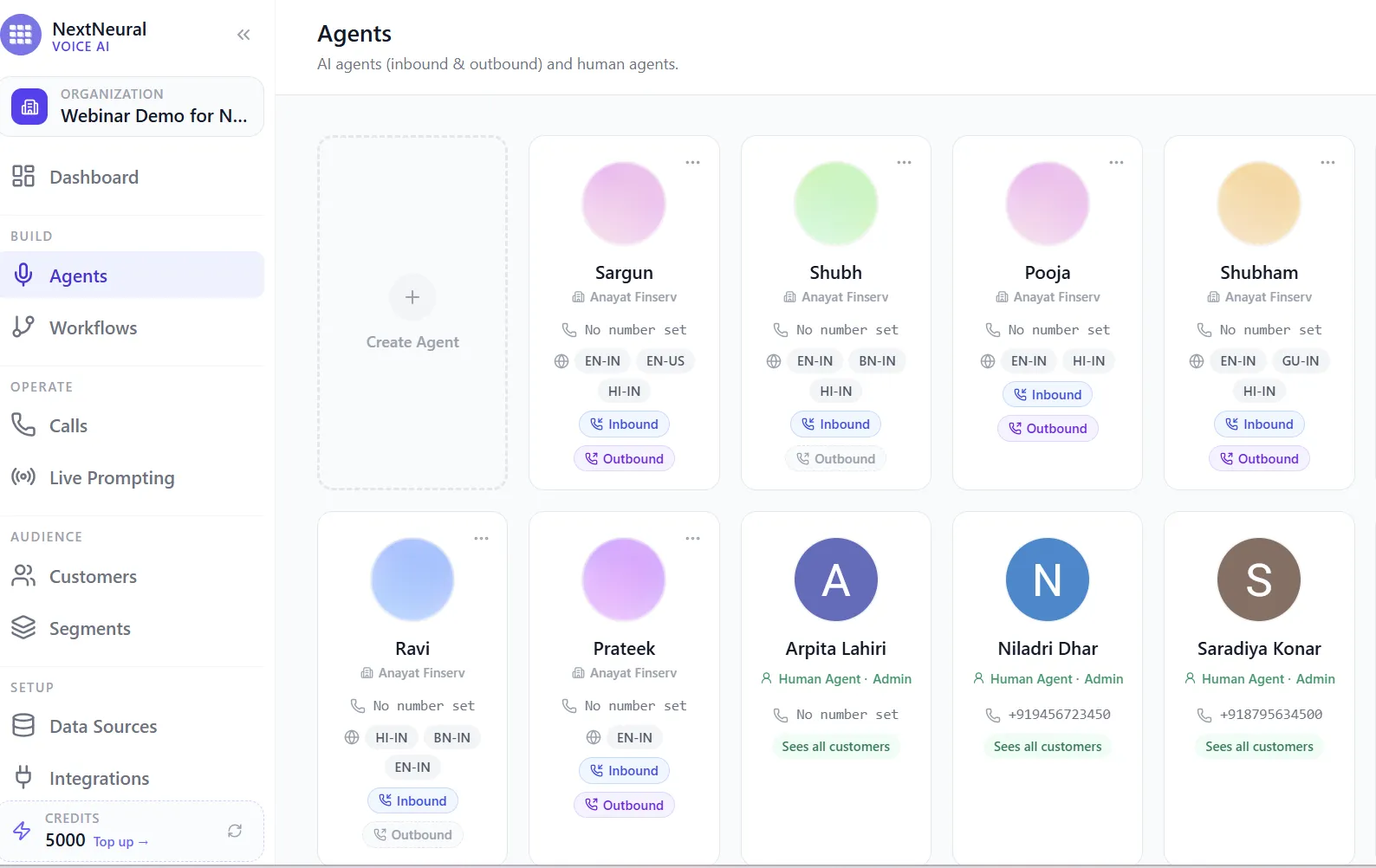
Step 5: Create a New Agent
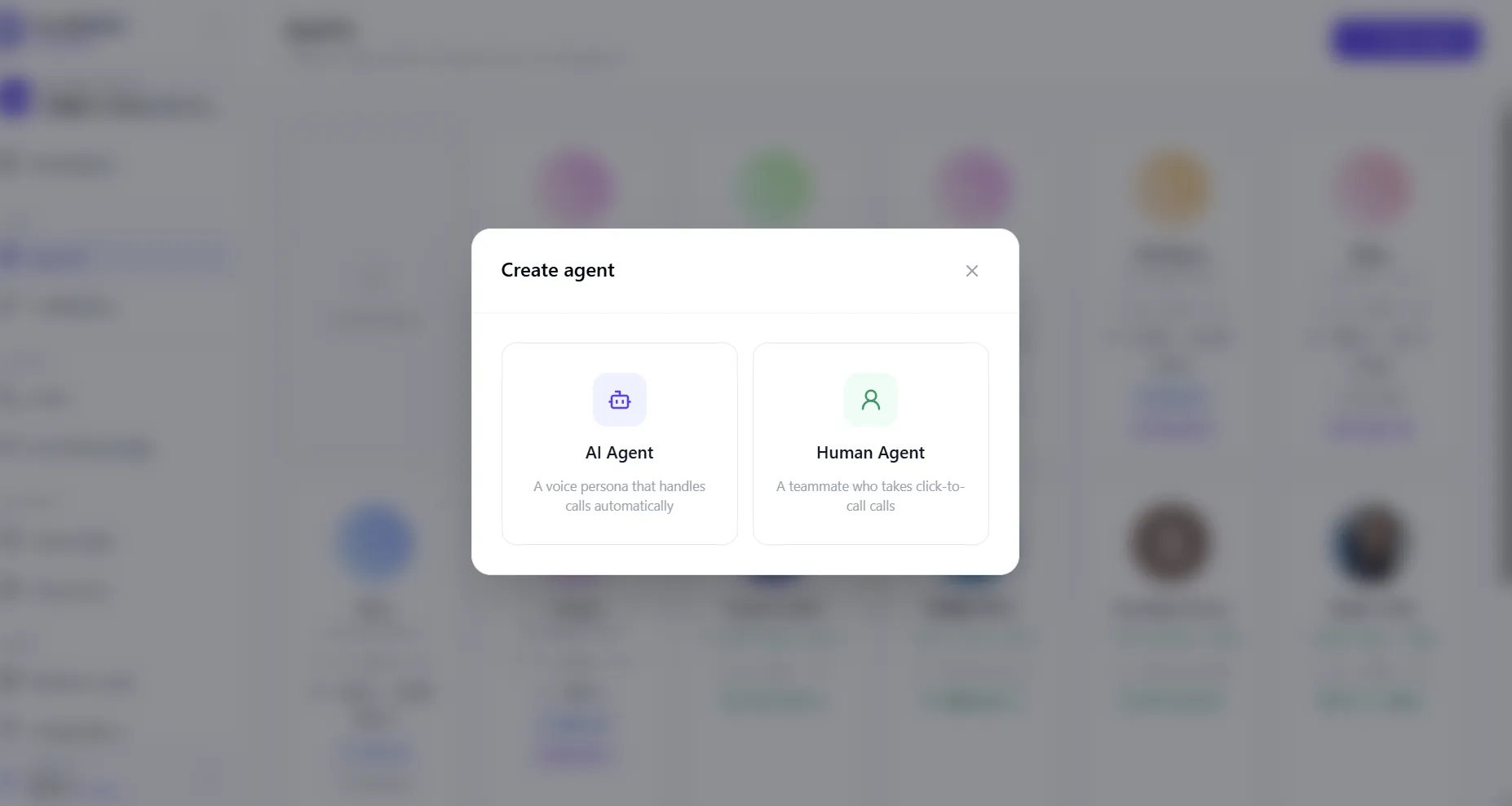
Click Create Agent and you’ll be asked to choose between an AI Agent, a voice persona that handles calls automatically, or a Human Agent, a teammate who takes click-to-call calls. For loan enquiries and collections, you’ll mostly be creating AI agents, with human agents set up as the fallback for when a call needs a real person.
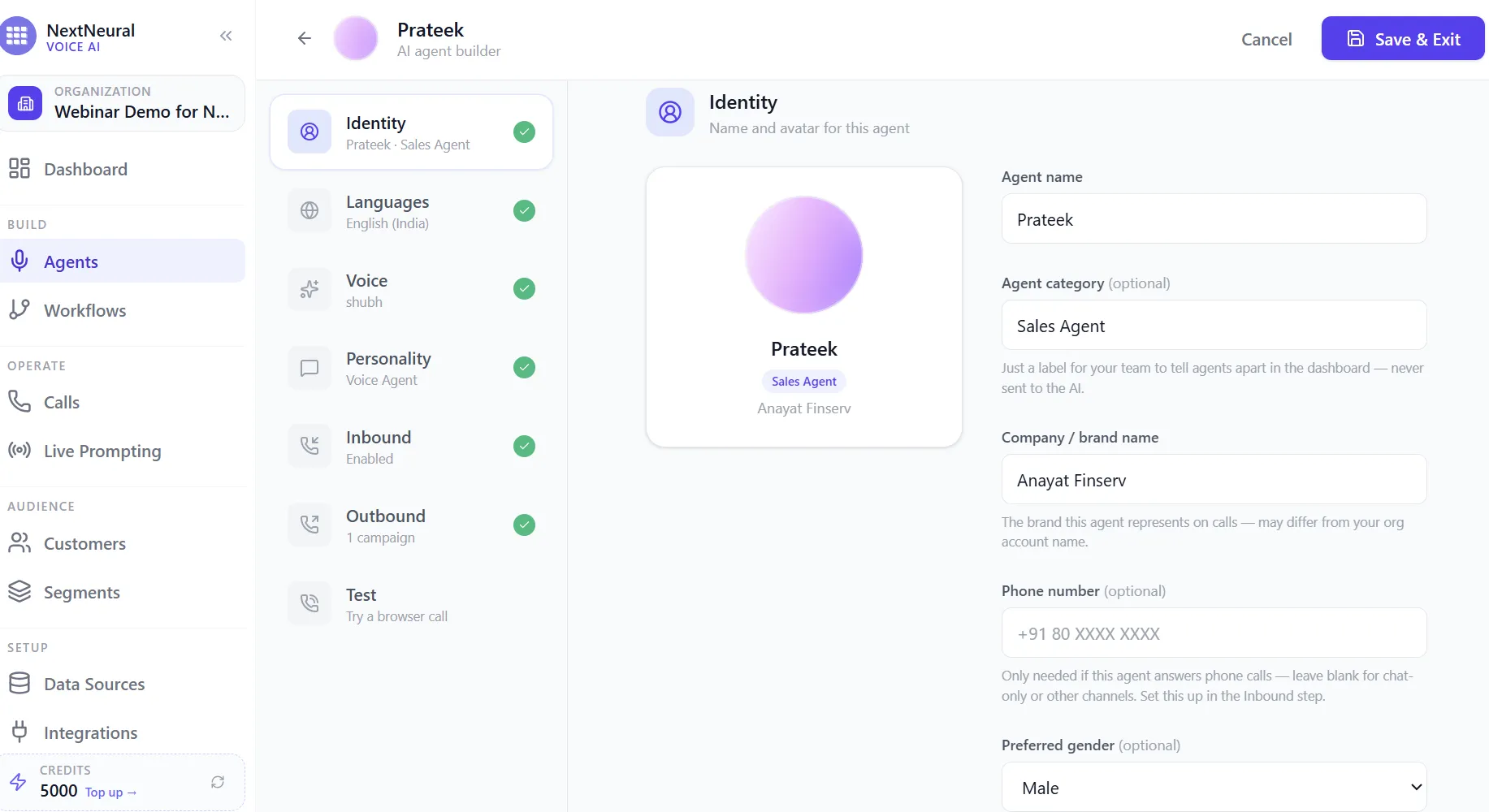
Step 6: Set the Agent’s Identity
Give your agent a name and, optionally, a category label like Sales Agent, purely for your team’s reference. Set the company or brand name the agent represents on calls, and a phone number if the agent needs to answer or place calls directly.
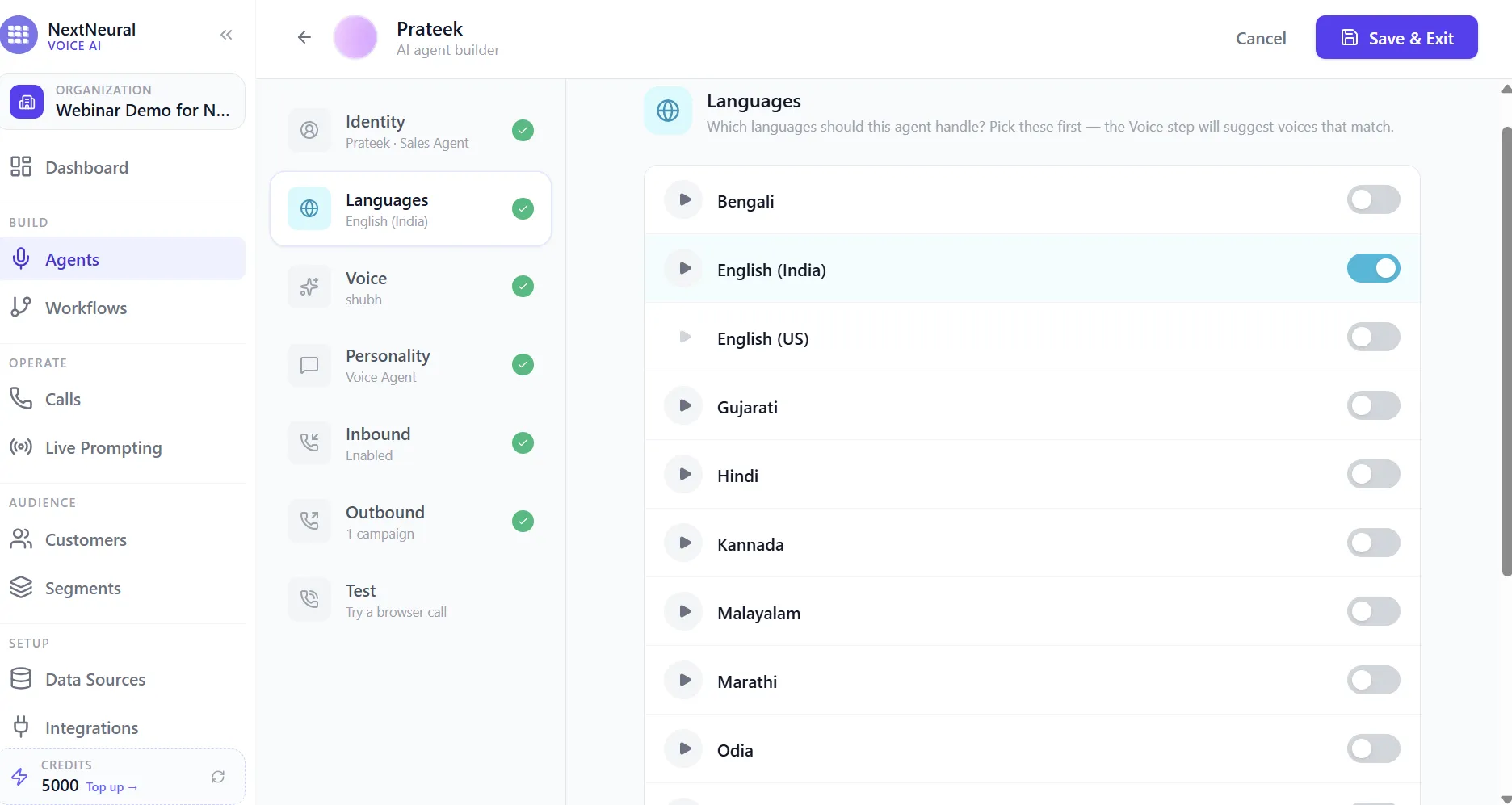
Step 7: Choose the Agent’s Languages
This is where the language piece really comes alive. Pick every language this agent should handle, from Bengali, Hindi, and Marathi to English (India) and beyond. The voice step that follows will suggest voices that match whatever you select here. For an NBFC calling customers across Tier 2 and Tier 3 markets, this step alone is often the difference between a customer staying on the call or hanging up.
Step 8: Give the Agent a Voice
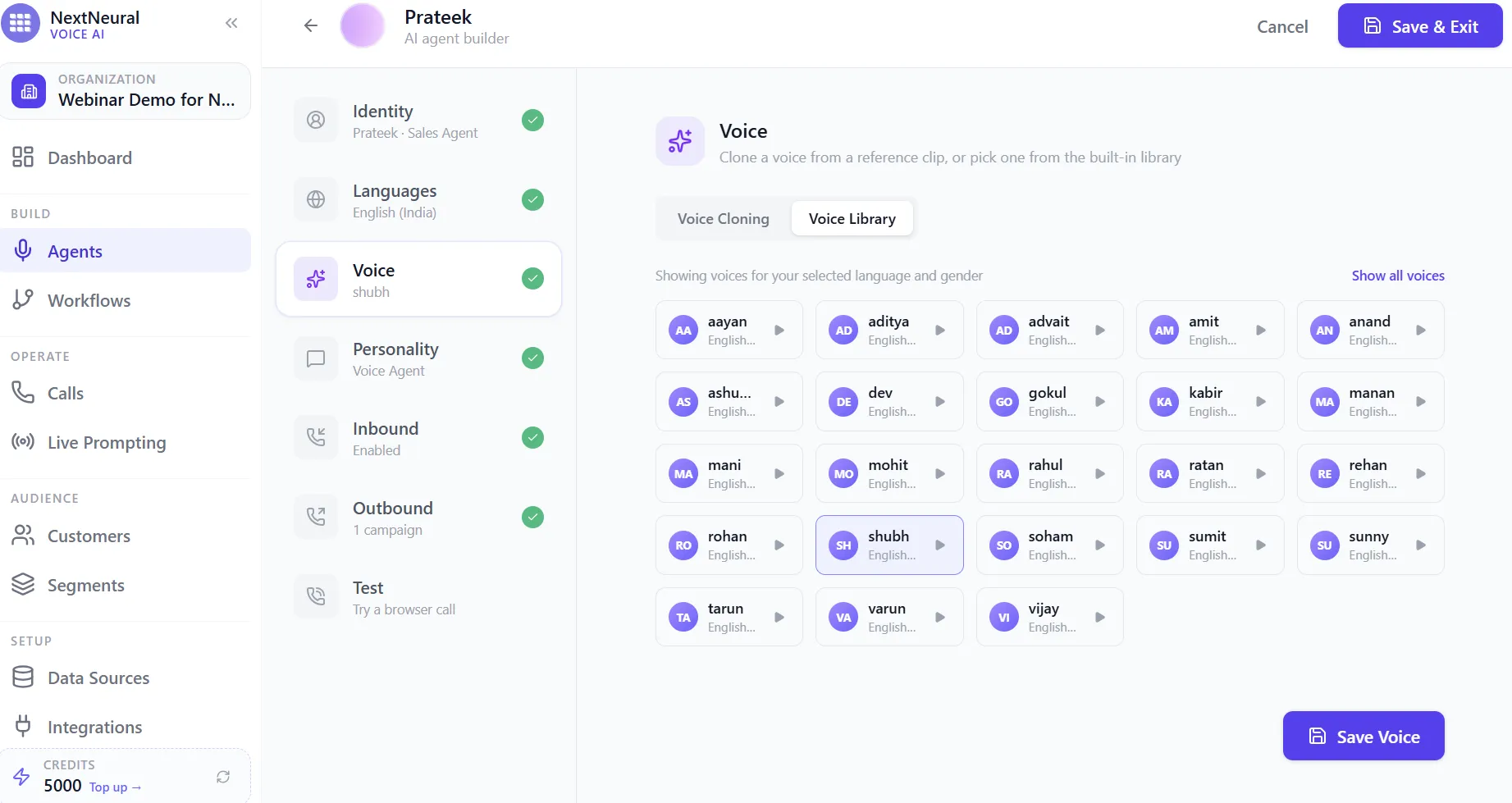
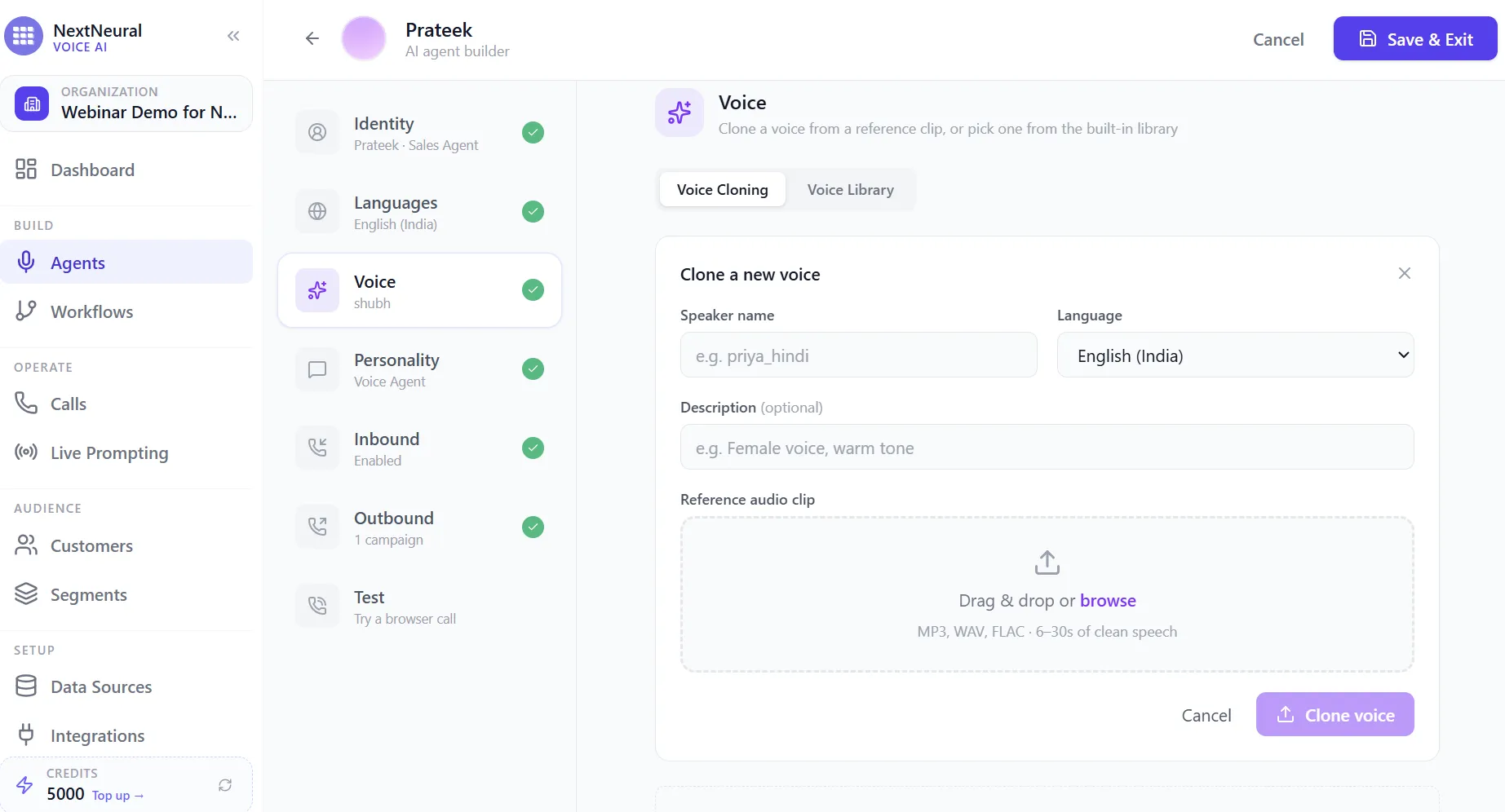
You have two options here. You can clone a voice from a short reference clip, useful if you want the agent to sound like a specific person your customers already trust, or you can pick a ready-made voice from the built-in library, filtered by the language and gender you’ve already chosen.
Step 9: Define the Agent’s Personality
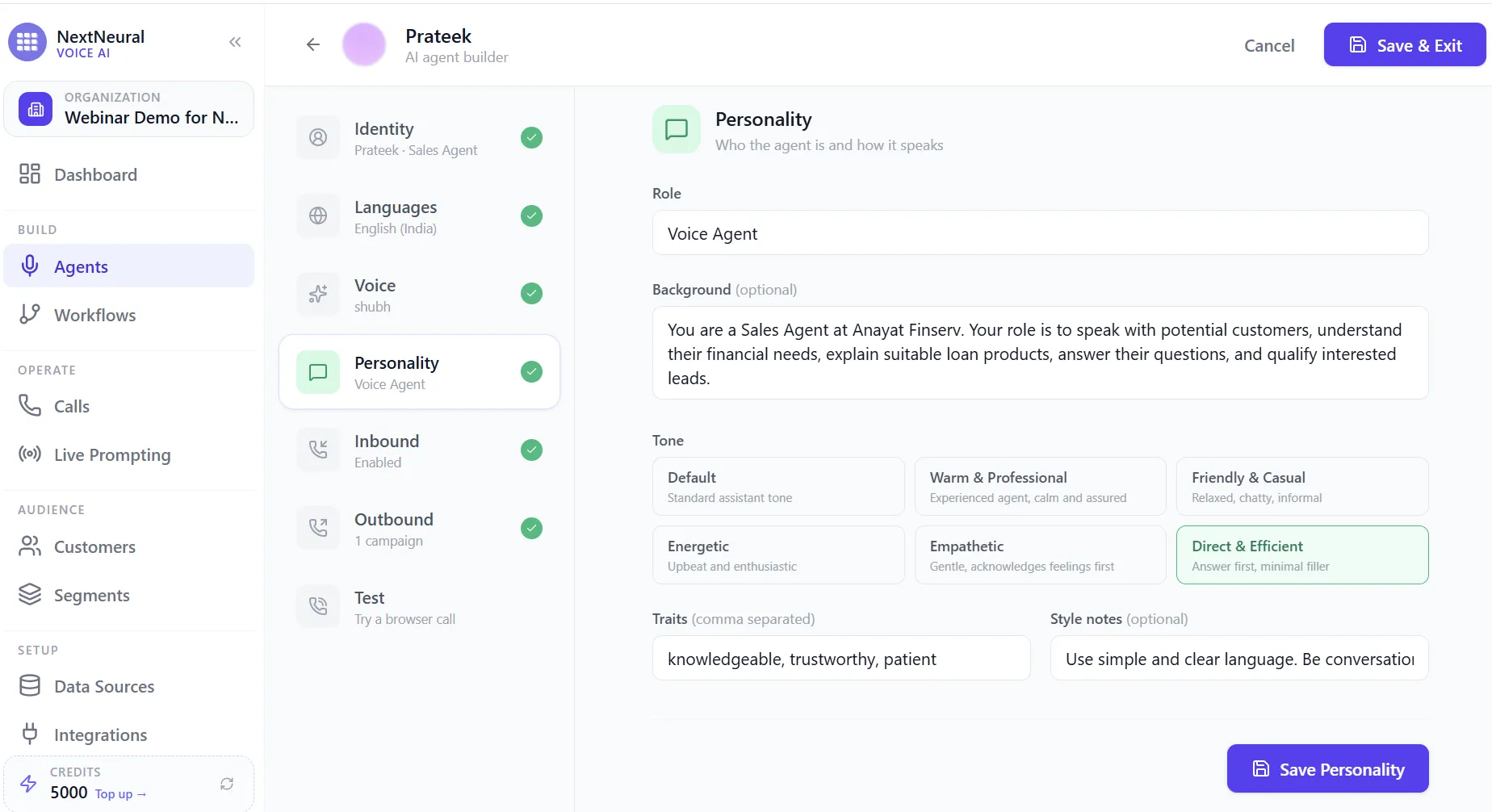
Give the agent a role and background, a general sense of tone (warm and professional, friendly and casual, direct and efficient, and so on), and a few traits and style notes. This is what stops the agent from sounding like a script being read aloud, and makes it sound like an actual sales or collections agent having a conversation.
Step 10: Build Your Workflow
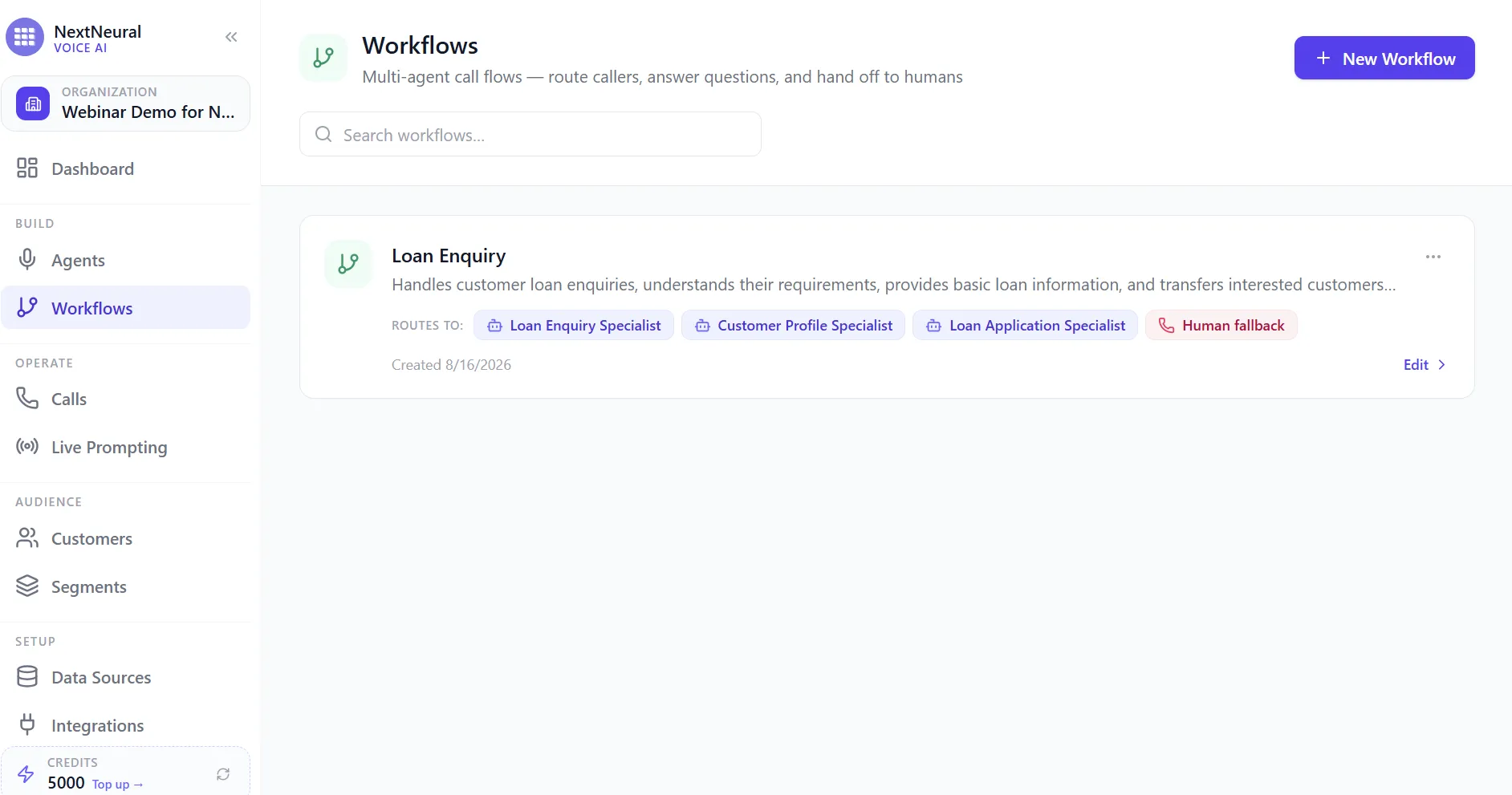
Once your agents exist, workflows are where you decide how a call actually flows: who answers first, who it routes to next, and what happens if nobody can help. This is the piece that turns a single AI agent into a full, multi-step conversation.
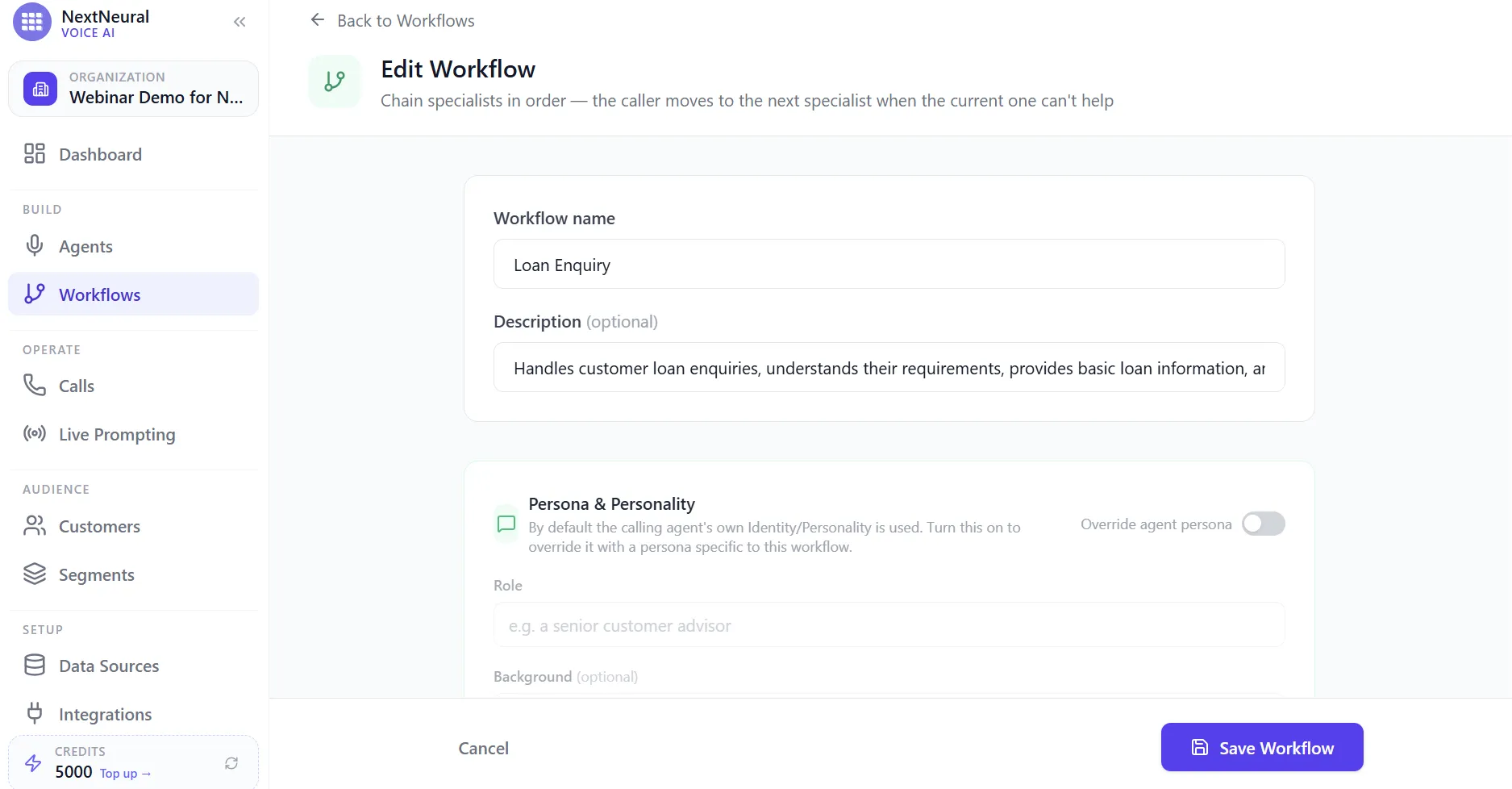
Step 11: Set Up the Workflow Basics
Name your workflow and give it a description of what it should handle. You can also choose whether the workflow uses the calling agent’s own identity and personality by default, or overrides it with a persona specific to that workflow.
Step 12: Add Your Specialists
Rather than building one large agent that tries to do everything, you chain together specialists, each one responsible for a different part of the conversation. A Loan Enquiry Specialist handles loan type, amount, and purpose. Give it a clear system prompt describing its role, and a list of questions it should work through during the call, used as a guide rather than a rigid script.
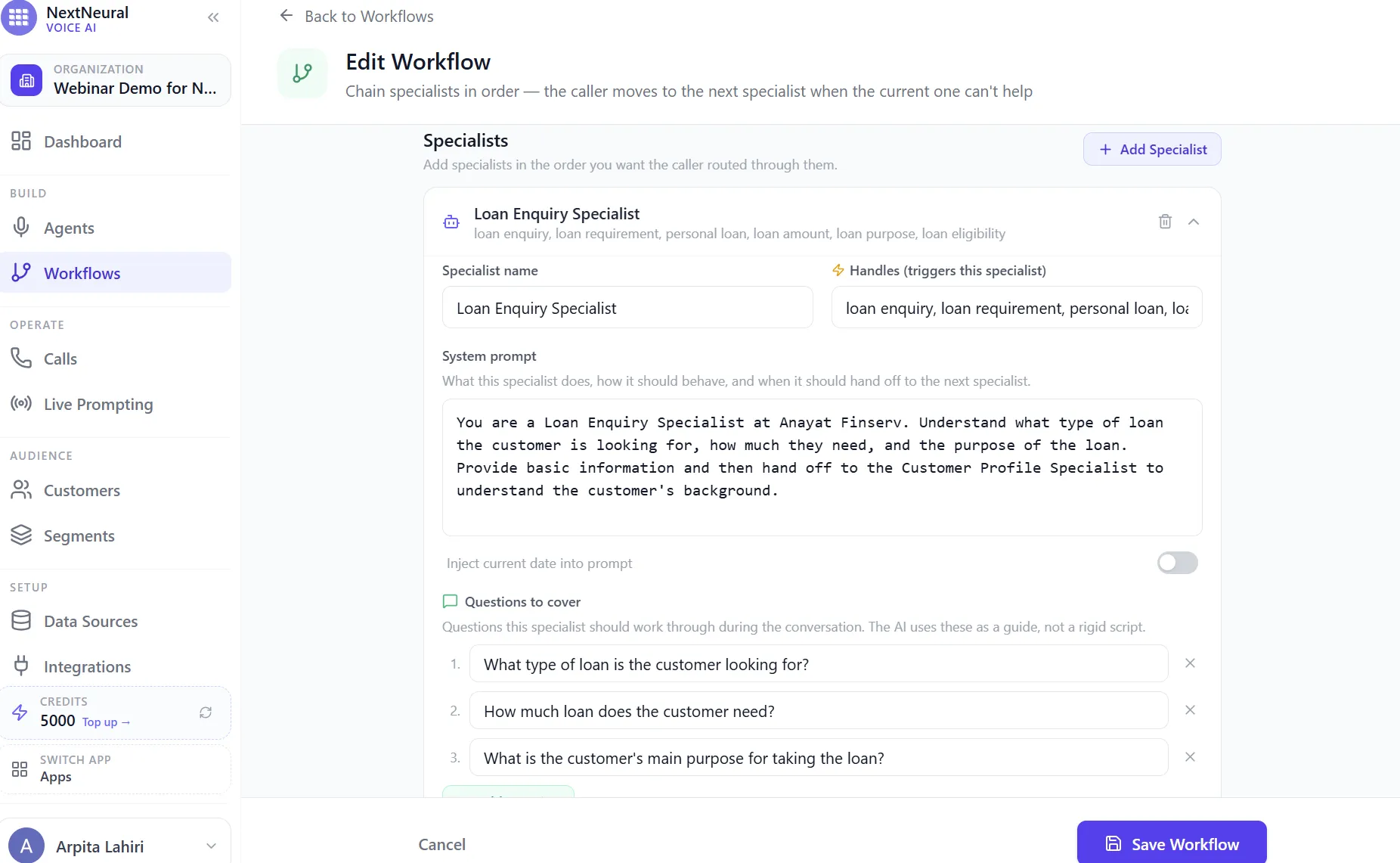
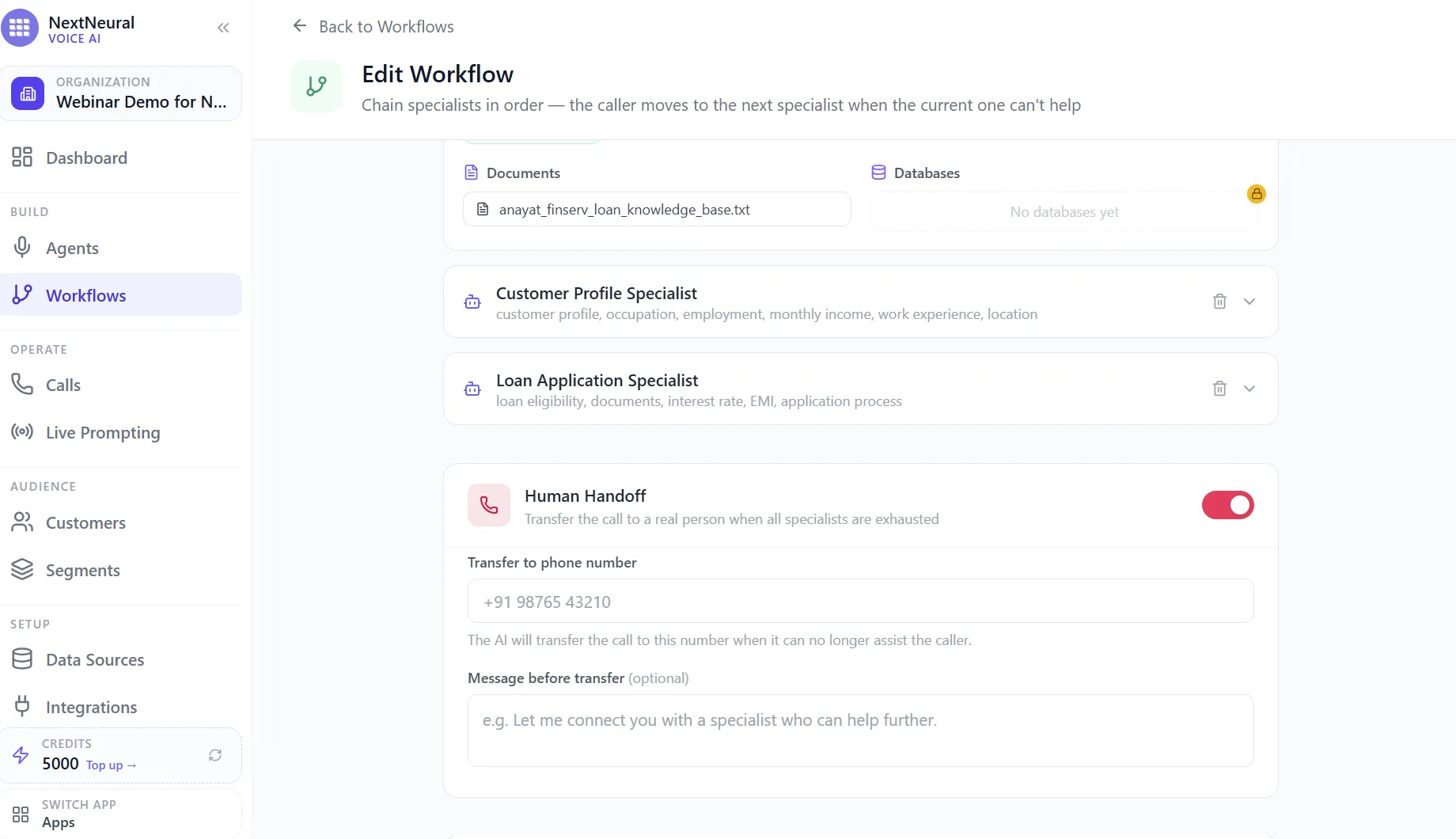
From there, you can add a Customer Profile Specialist to capture occupation, income, and background, and a Loan Application Specialist to handle eligibility, documents, and EMI questions. A router listens to the caller’s first message and sends them to whichever specialist fits, and if a customer starts by explaining they missed a payment instead of asking about a new loan, the same pattern applies for collections specialists trained on PTP capture, payment issues, and callback scheduling.
Step 13: Set Up Human Handoff
However good your specialists are, there will always be conversations that need a person: a complicated complaint, a request for an exception, or a customer who simply wants to talk to someone. Turn on Human Handoff, set the number the call should transfer to, and write a short message the AI says before handing off, something like “Let me connect you with a specialist who can help you further.” The human agent picks up the conversation with context already gathered, so the customer isn’t repeating their story from scratch.
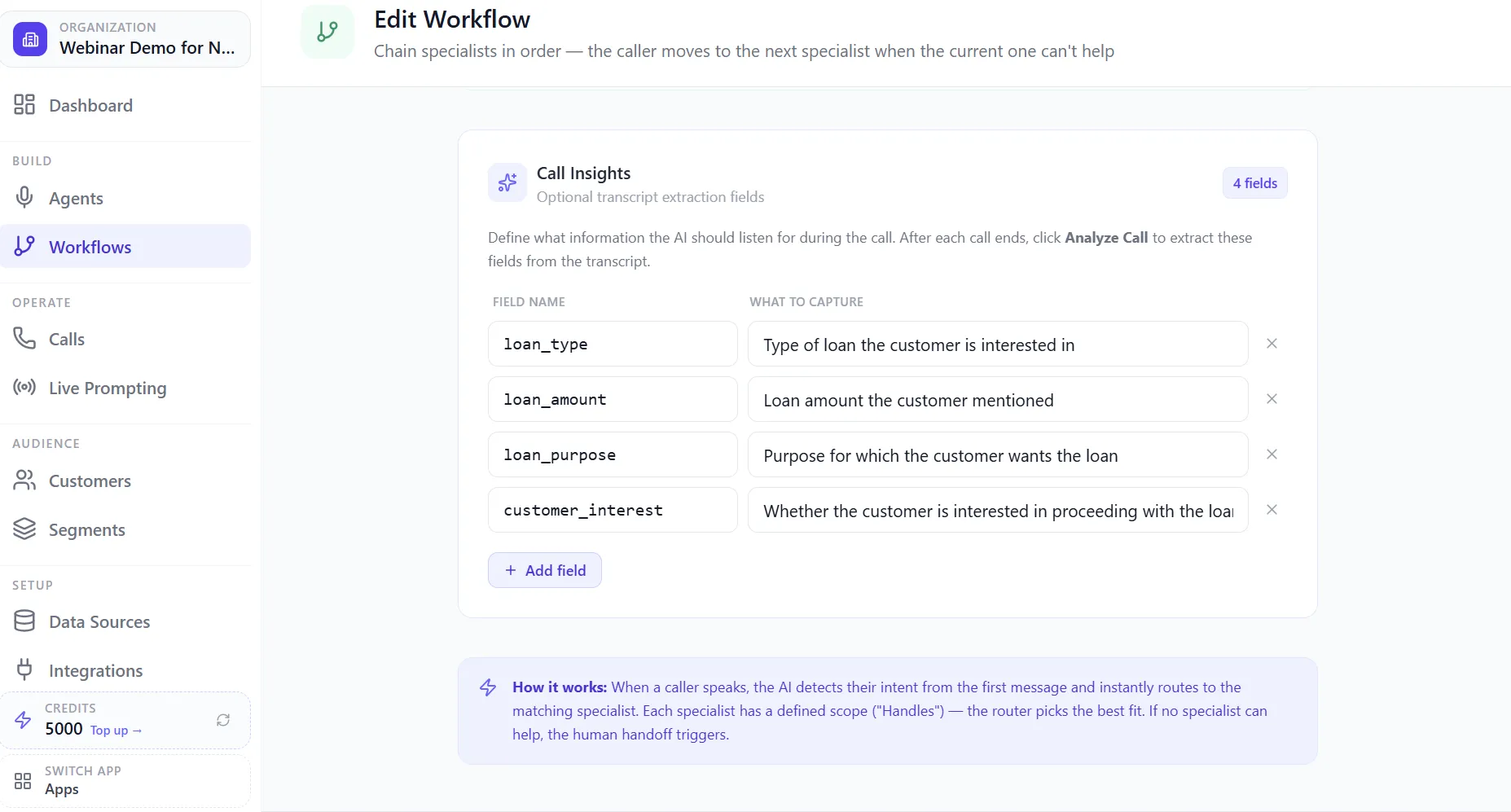
Step 14: Define What the AI Should Extract from Every Call
This is the step that turns your call recordings into structured business data instead of just an archive. Define fields you want captured from the transcript, things like loan type, loan amount, loan purpose, and customer interest for an enquiry call, or PTP status, payment issue, and follow-up requirement for a collections call. After each call ends, the AI extracts these fields automatically, so nobody has to sit and manually listen through hundreds of recordings to figure out what happened.
Step 15: Review, Preview, and Save
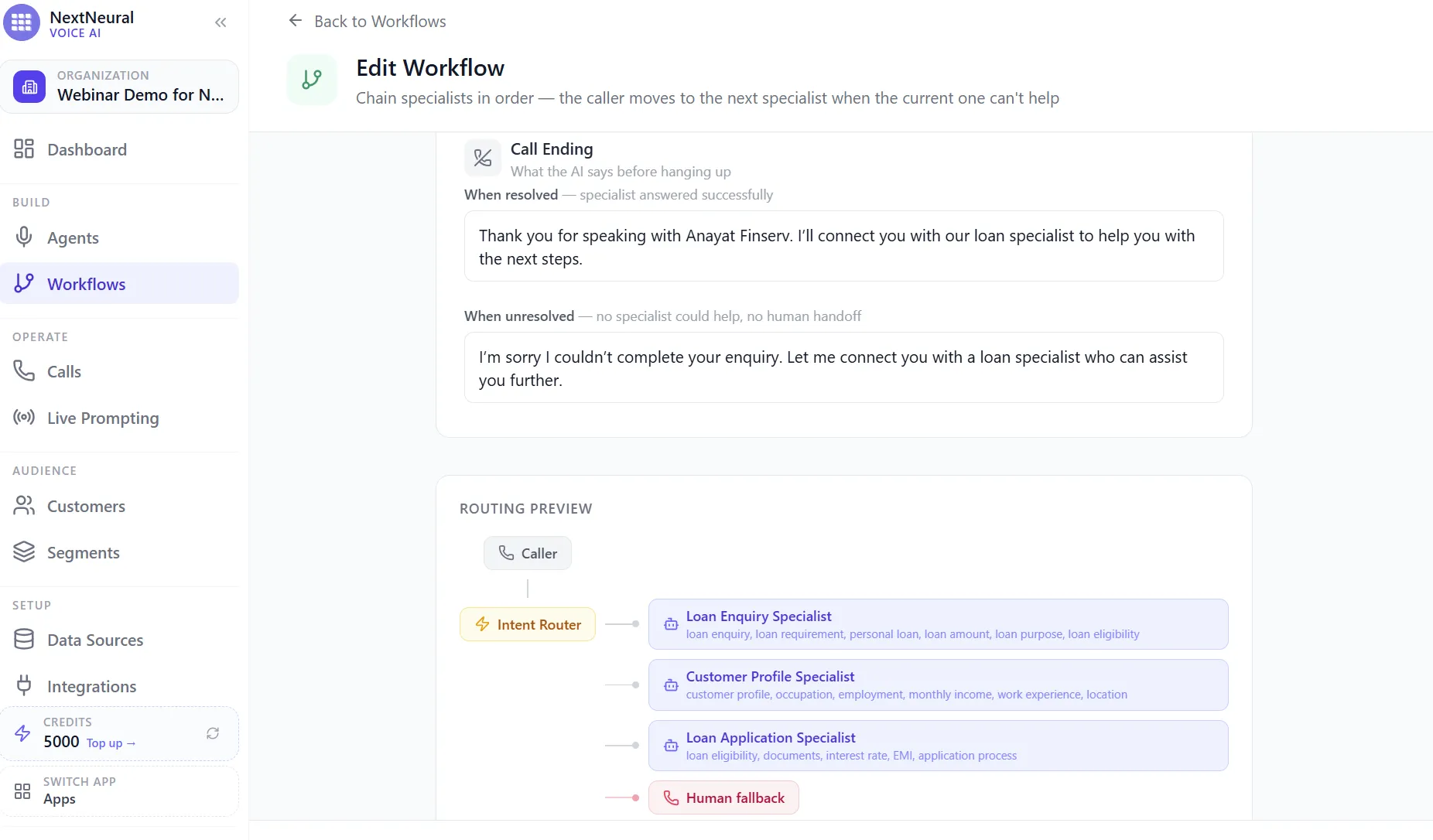
Before you save, you can set what the AI says when a call resolves successfully versus when it doesn’t, and preview the entire routing logic in one view, from the caller, through the intent router, through each specialist, to the human fallback. Once it looks right, save the workflow and it’s live.
At this point, your agent can handle inbound calls end to end. But you don’t just wait for the phone to ring, you reach out first. That’s where outbound campaigns come in.
Step 16: Write the Campaign Script
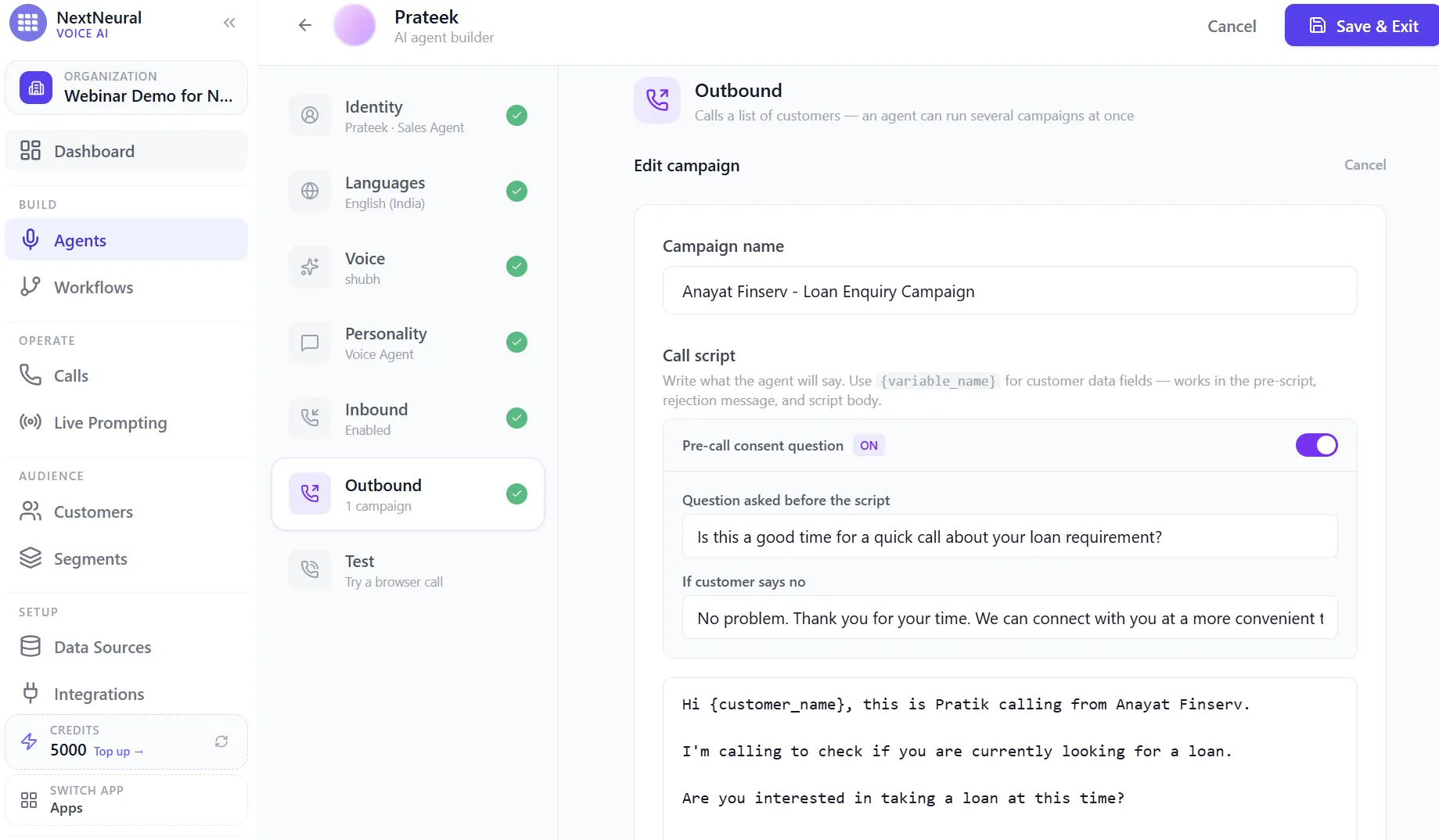
Head to the Outbound tab on your agent and start a new campaign. Give it a name, then write the call script itself, including a pre-call consent question, so the agent asks something like “Is this a good time for a quick call about your loan requirement?” before going any further, along with what it should say if the customer says no. The opening lines of the script itself can pull in variables like {customer_name}, so every call still feels personal even though it’s running at scale.
Step 17: Add Follow-up Questions and Target the Right Customers
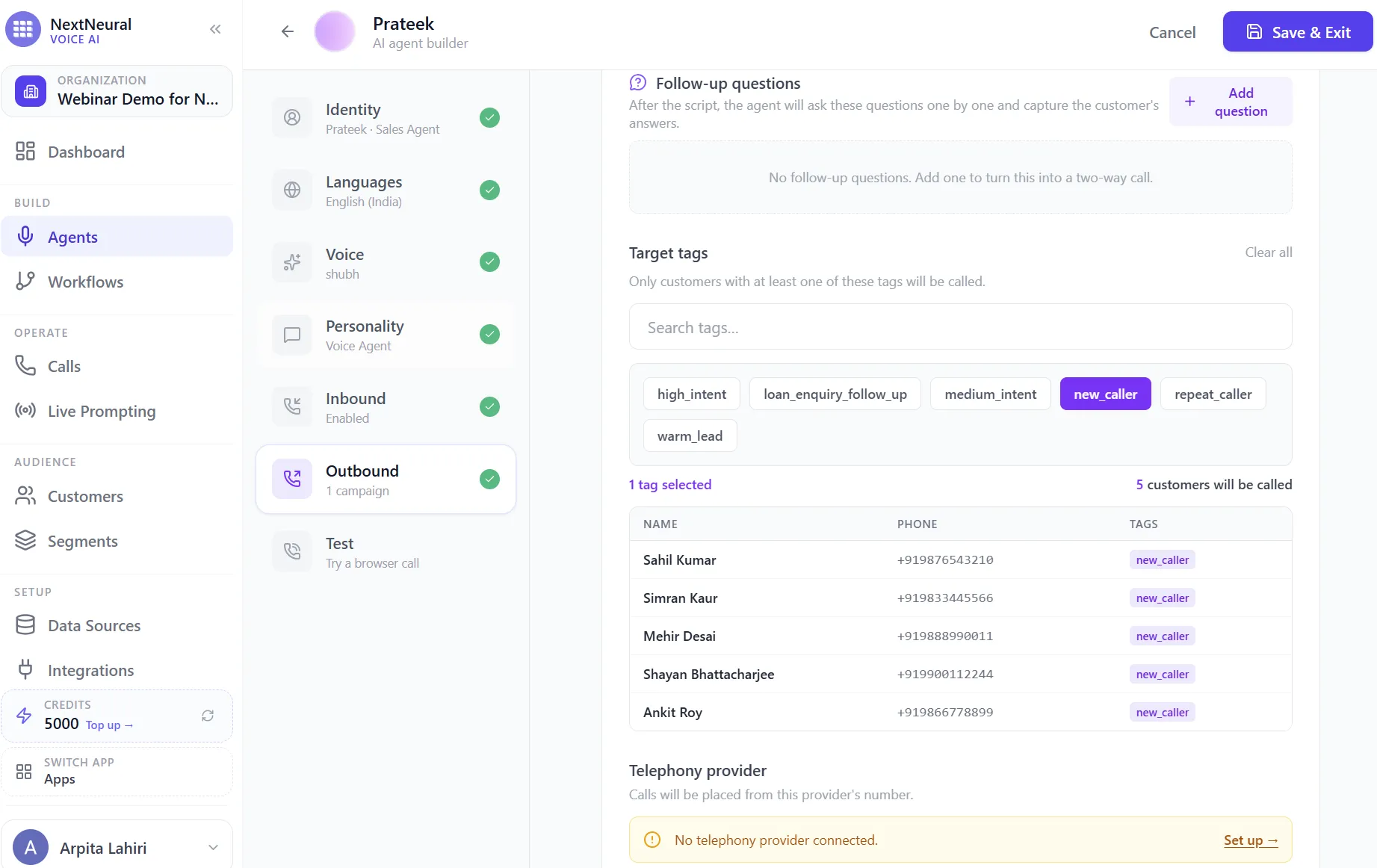
Below the script, add follow-up questions the agent should ask one by one to turn this into a real two-way conversation, not just a message being read out. Then set your target tags. Only customers carrying at least one of the tags you select, say new_caller, will be pulled into this campaign, and the platform shows you exactly how many customers match and lists them by name before you commit to anything.
Step 18: Set the Schedule and Dialing Mode
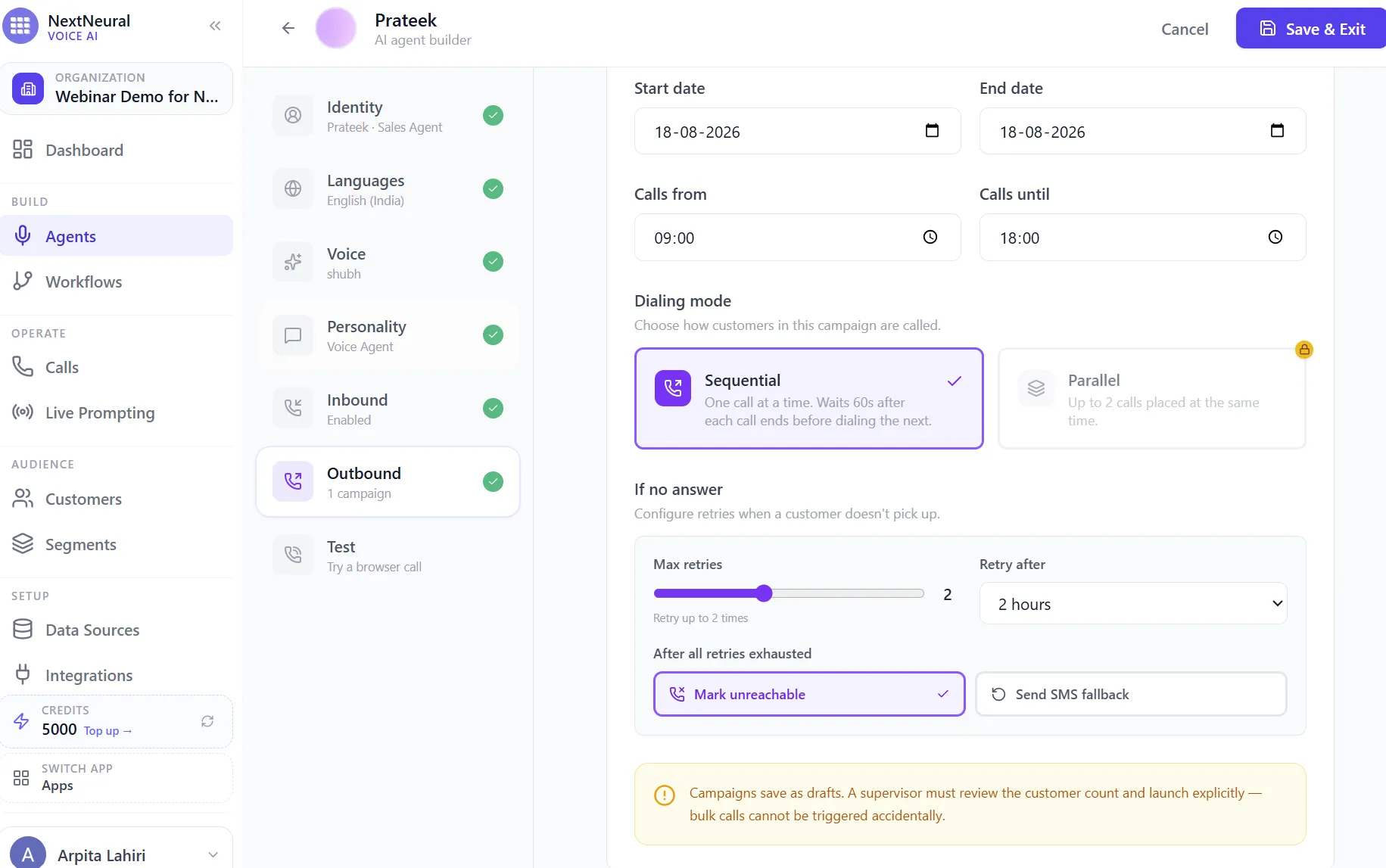
Decide the campaign’s start and end dates, and the hours calls are allowed to go out in. You already know that according to RBI rules, outbound collection calls and automated dialer outreach are allowed between 8 am and 7 pm only. Choose a dialing mode: Sequential places one call at a time and waits a minute after each one ends, which is the safer default. Then configure what happens if a customer doesn’t pick up: how many retries, how long to wait between them, and whether an unreachable customer is simply marked as such or gets a fallback SMS. Campaigns save as drafts at this stage, so a supervisor still has to review the customer count and launch explicitly. Bulk calls can’t go out by accident.
Step 19: Decide What Happens After the Script
Once the script finishes, you get to choose what happens next. You can simply end the call, or you can continue the conversation and hand it off to a workflow, which is what lets the same Loan Enquiry workflow you built earlier take over mid-call and start asking the customer real qualifying questions instead of just reading a script at them.
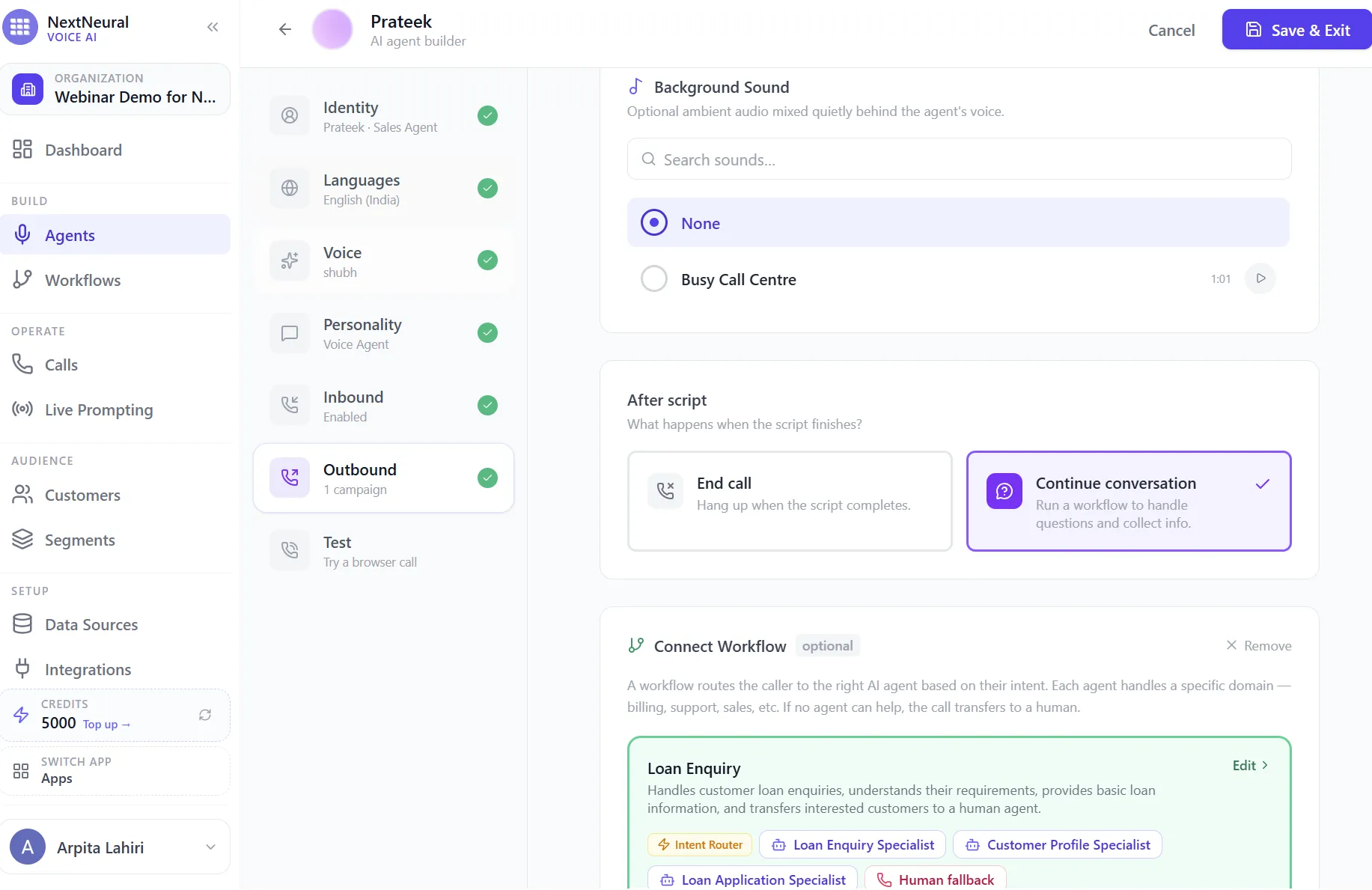
Step 20: Set the Call’s Intent and CTA
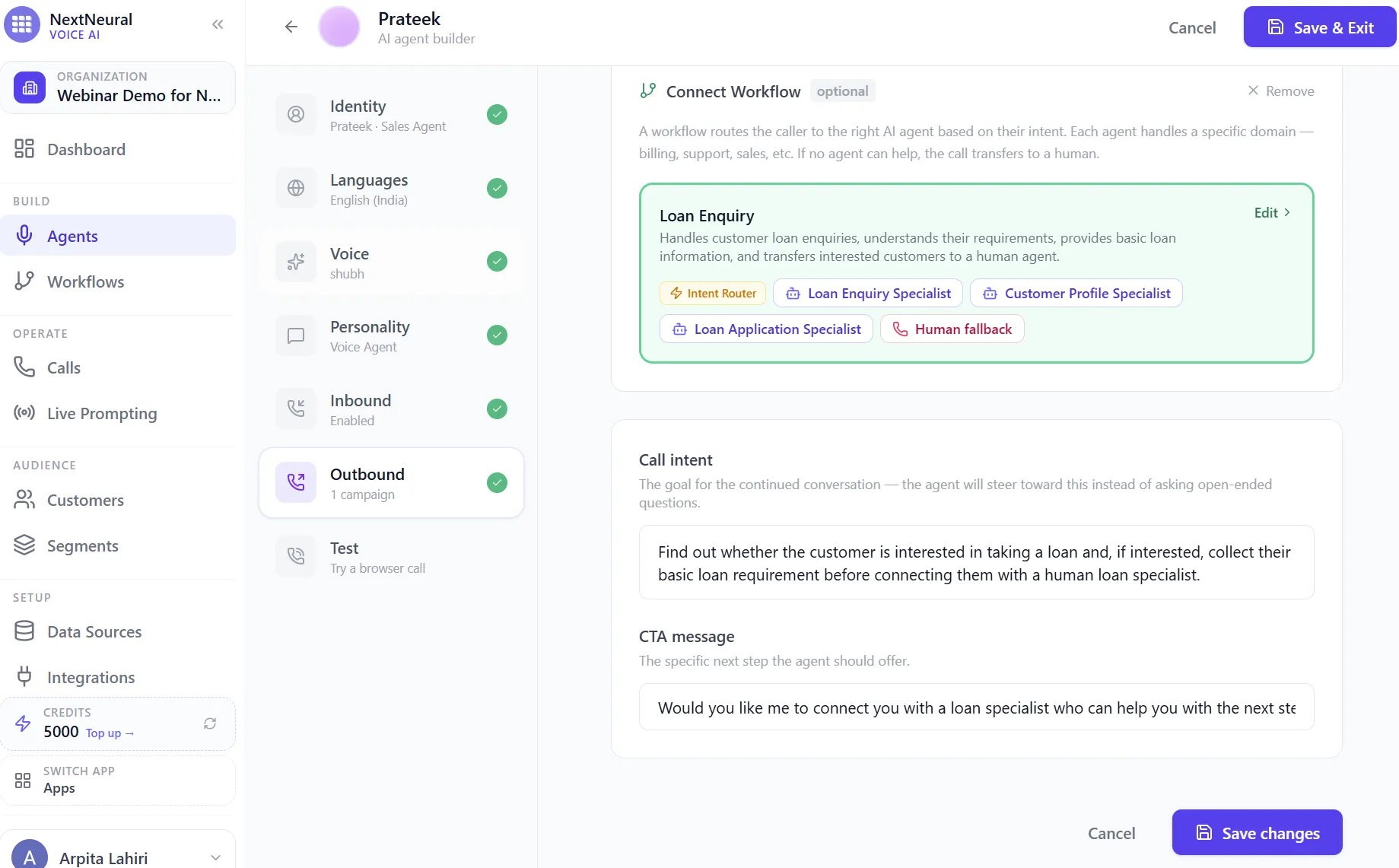
With the workflow connected, define the call intent, the specific goal the agent should steer toward instead of asking open-ended questions, and a CTA message, the exact next step it should offer the customer. For a loan enquiry campaign, that’s usually confirming interest, capturing the basic requirement, and asking if the customer wants to be connected to a human loan specialist.
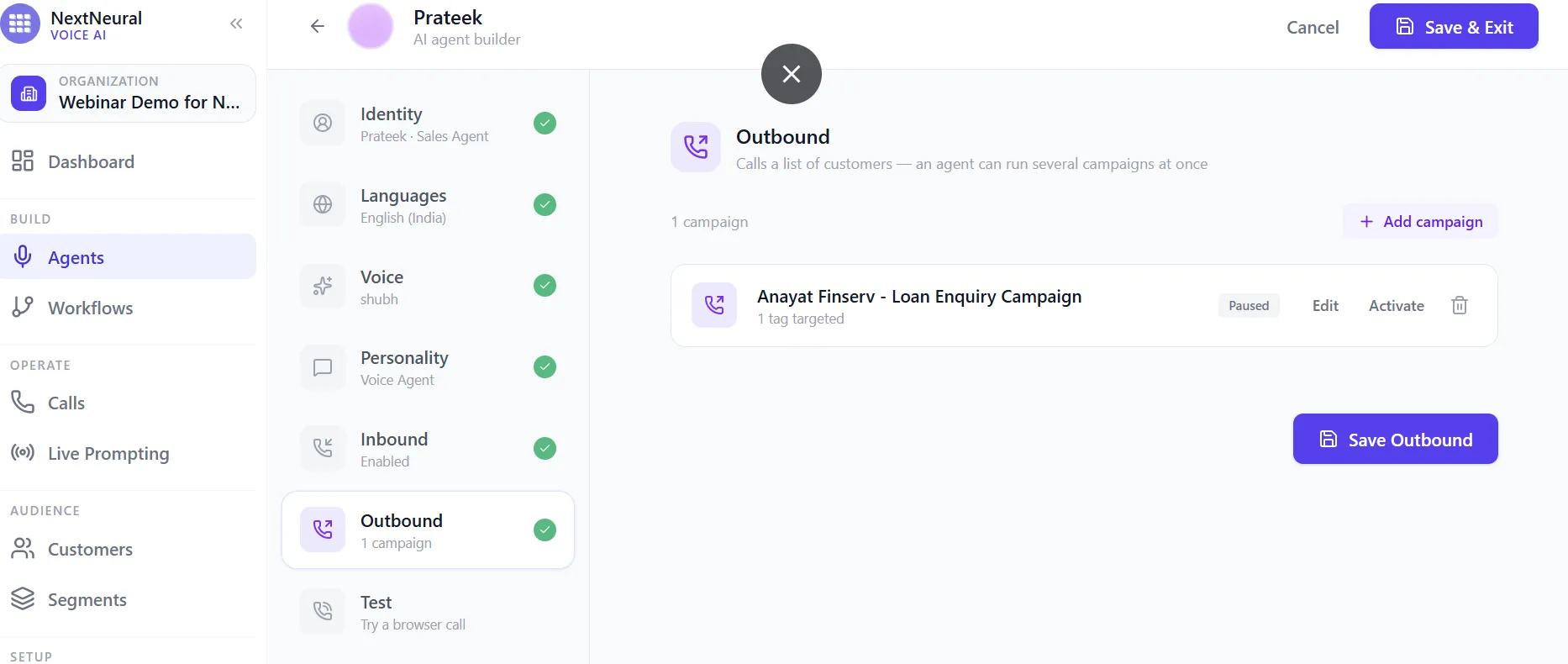
Step 21: Save and Activate the Campaign
Save the outbound setup and you’ll see your campaign listed, paused by default, with the option to edit it further or activate it once you’re ready to actually place calls. This is also where you’d manage multiple campaigns if an agent is running more than one at a time.
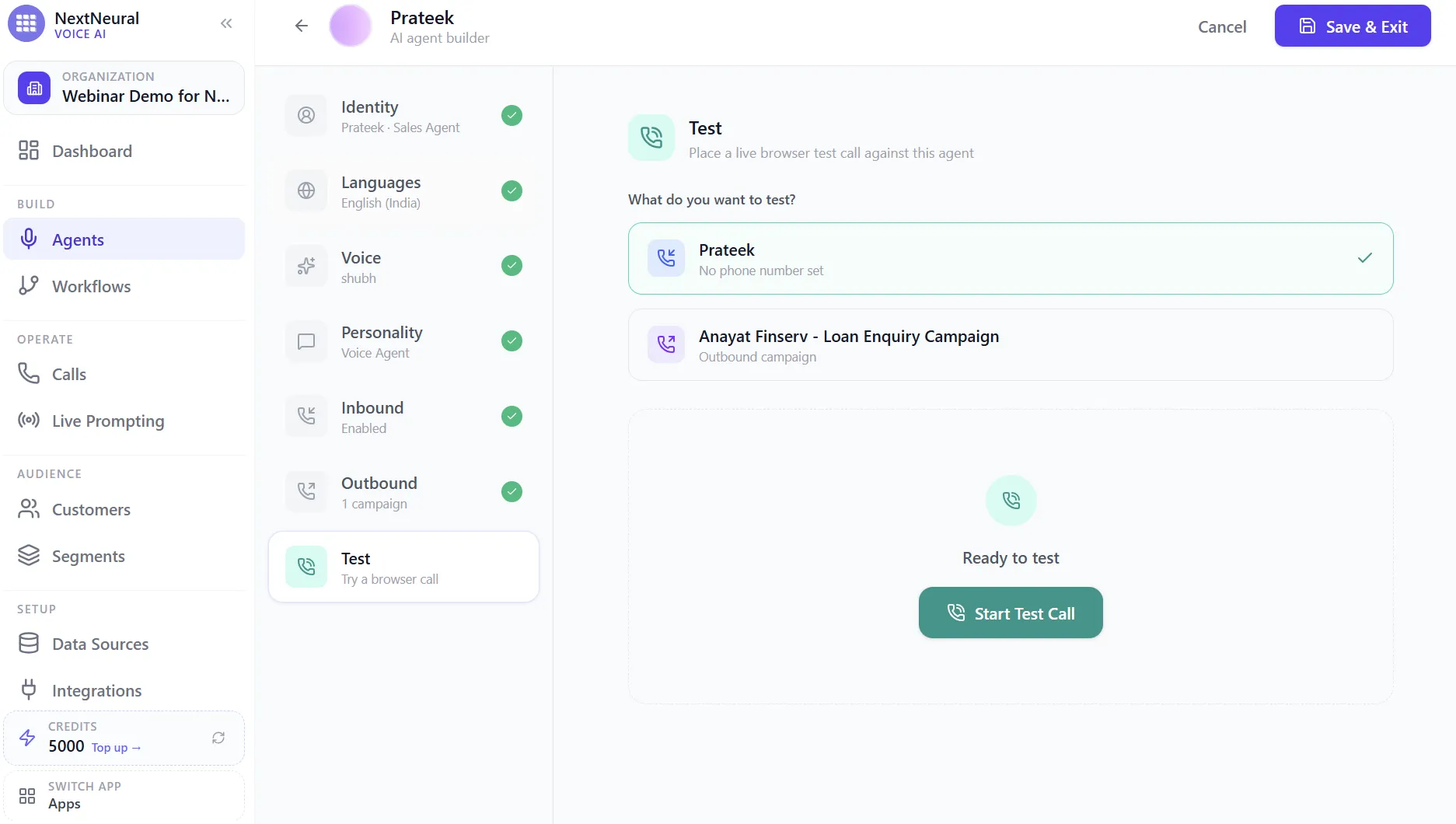
Step 22: Test Before You Go Live
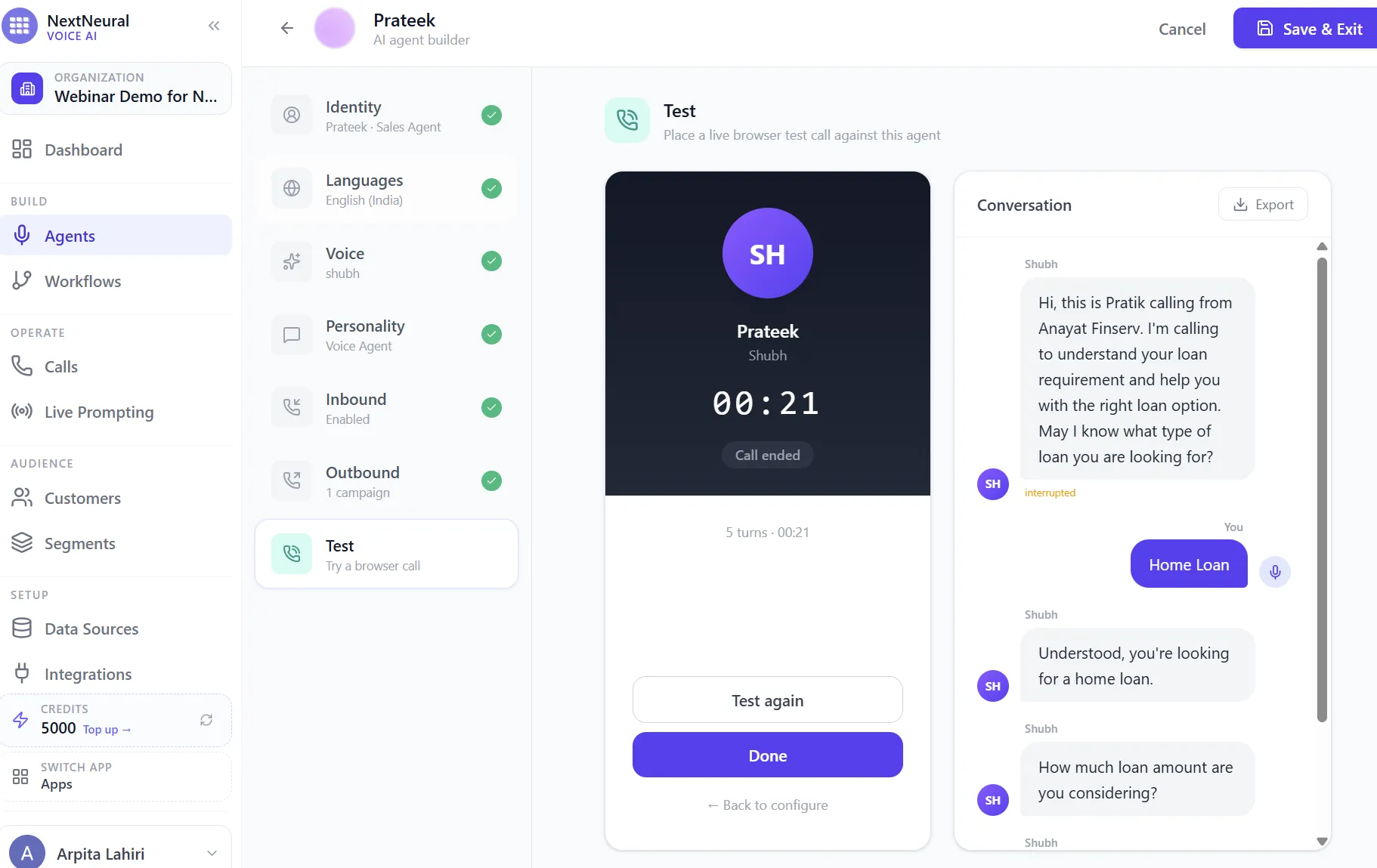
Before any of this touches a real customer, use the Test tab to place a live browser test call. You can test the agent on its own, or test the actual outbound campaign end to end, script, follow-up questions, and workflow handoff included.
Step 23: Listen to the Conversation Play Out
Once the test call connects, you can watch the conversation unfold turn by turn in real time, exactly as a customer would experience it. In this example, the agent opens with the script, asks what type of loan the customer is looking for, understands “home loan,” confirms it back, and moves straight into the next qualifying question, all in a natural back and forth rather than a rigid script.
That test call is your last checkpoint. If the script sounds natural, the follow-up questions land in the right order, and the handoff into the workflow feels smooth, you’re ready to activate the campaign and let it run.
Bringing It Back to Collections
Everything above was walked through using a loan enquiry workflow, but the exact same pattern applies to collections, just with different specialists and a different set of questions to cover.
Instead of a Loan Enquiry Specialist, you’d build a Collections Specialist whose system prompt focuses on understanding whether the customer can pay, capturing a promise to pay with a date, or identifying a payment issue that needs escalation. Your Call Insights fields would shift to things like ptp_status, payment_date, payment_issue, and escalation_required. Your customer segments would shift from high_intent and warm_lead to something closer to soft_bucket and hard_bucket, so agents can tell instantly which customers need a gentle reminder and which need a more structured follow-up sequence.
The language step matters just as much here, arguably more. A customer three payments behind is far more likely to engage with a call in Bengali or Hindi than one in English, and far less likely to hang up on someone speaking their language.
And the human handoff step becomes just as important in collections as it is in sales. A customer asking about restructuring, disputing a charge, or going through genuine financial hardship needs a person, not a script. The AI’s job is to handle the volume, the routine follow-ups, and the disposition tracking. The judgment calls stay with your team.
Compliance and Governance: Where Does Your Data Actually Live
Everything you’ve just built handles customer identity, income, loan requirements, repayment history, and full call recordings. For an NBFC, it’s the first question your compliance and risk teams are going to ask before any of this goes live: where does this data go, and who can see it?
This is where architecture matters as much as the workflow itself.
Data sovereignty and hosting. Depending on how the platform is deployed, you can choose where the models and AI components actually run. That could mean hosting on your own premises, inside your preferred cloud environment (AWS, Azure, or a data centre physically located in India), or a hybrid setup where the conversation layer runs close to your infrastructure while only what’s strictly necessary leaves the boundary. The point isn’t to avoid the cloud, it’s to avoid sending sensitive customer data to an external AI service by default, without you having decided that’s acceptable.
Open source and deployable models. Using open, deployable models instead of only calling a closed third-party API gives you more control over exactly this. You can run the model within your own environment, apply your own access controls, and audit what’s actually happening to a customer’s data during a call, rather than trusting a black box you don’t operate.
Where to Start
You don’t need to automate the entire customer journey on day one. Start with one workflow, either loan qualification or a simple payment-reminder collections flow, get the agent, voice, and knowledge base right, and expand from there. Add outbound campaigns once your inbound flow is solid, layer in call insights so you can see what’s actually happening across hundreds of conversations, and only then connect everything back into your CRM and loan management systems.
Built this way, Voice AI doesn’t replace your team. It handles the volume so your people can focus on the calls that actually need a human.
Everything walked through in this post, the agents, the workflows, the specialists, the outbound campaigns, is built on cloud.nextneural.ai. New accounts start with 4,000 free credits, enough to build and test the exact setup covered here before you commit to anything.
Want to see how this could work for your loan enquiry or collections workflow? Request access to get on the waitlist, or talk to our team for a demo.
Built by the Team Behind Superteams.ai
NextNeural is built and run by Superteams.ai, an R&D-first team that ships production-grade AI systems in 30 to 90 days, across real estate, fintech, and SaaS. The same team behind this platform is the one you’d be talking to.
If you want to walk through what a loan qualification or collections workflow could look like for your NBFC specifically, book a strategy call with Superteams.
Sources: Reserve Bank of India, Annual Report 2024-25; Reserve Bank of India, Annual Report 2024-25: Credit Delivery and Financial Inclusion; Internet and Mobile Association of India & Kantar, Internet in India 2024.
Ready to Transform Your Business with AI?
Join NextNeural today and deploy production-ready AI agents in minutes.
Build an Agent